
Criar públicos personalizados no Ad Manager
In this article we will be elaborating on the steps one needs to take to create Custom Audiences and how to use it during the campaign creation process in Ad Manager.
TABLE OF CONTENTS
- Where to find the option to create custom audiences?
- How to create a custom audience?
- How to create a Website Custom Audience?
- How to create a Facebook Page Custom Audience?
- How to create a Lead Form Custom Audience?
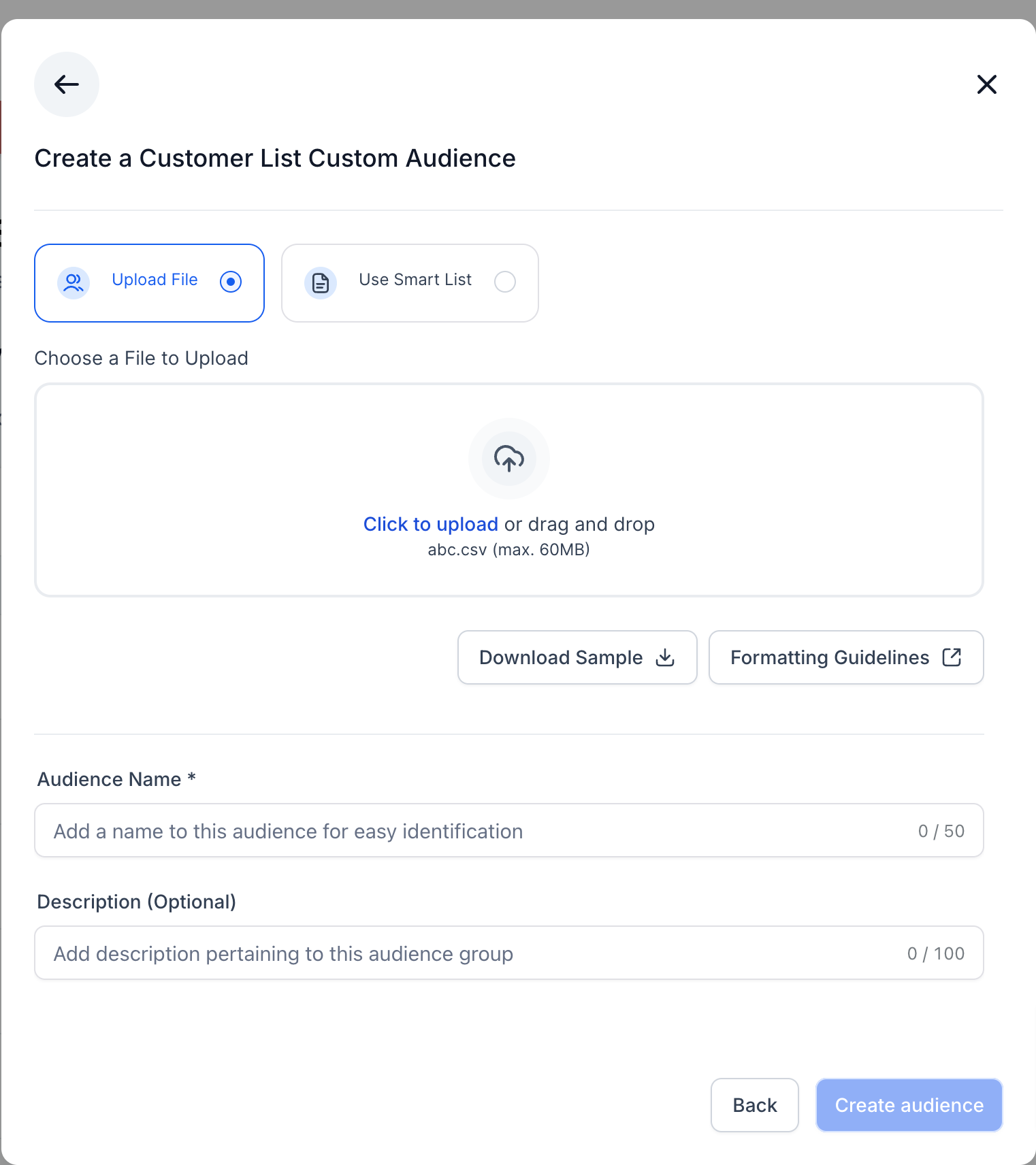
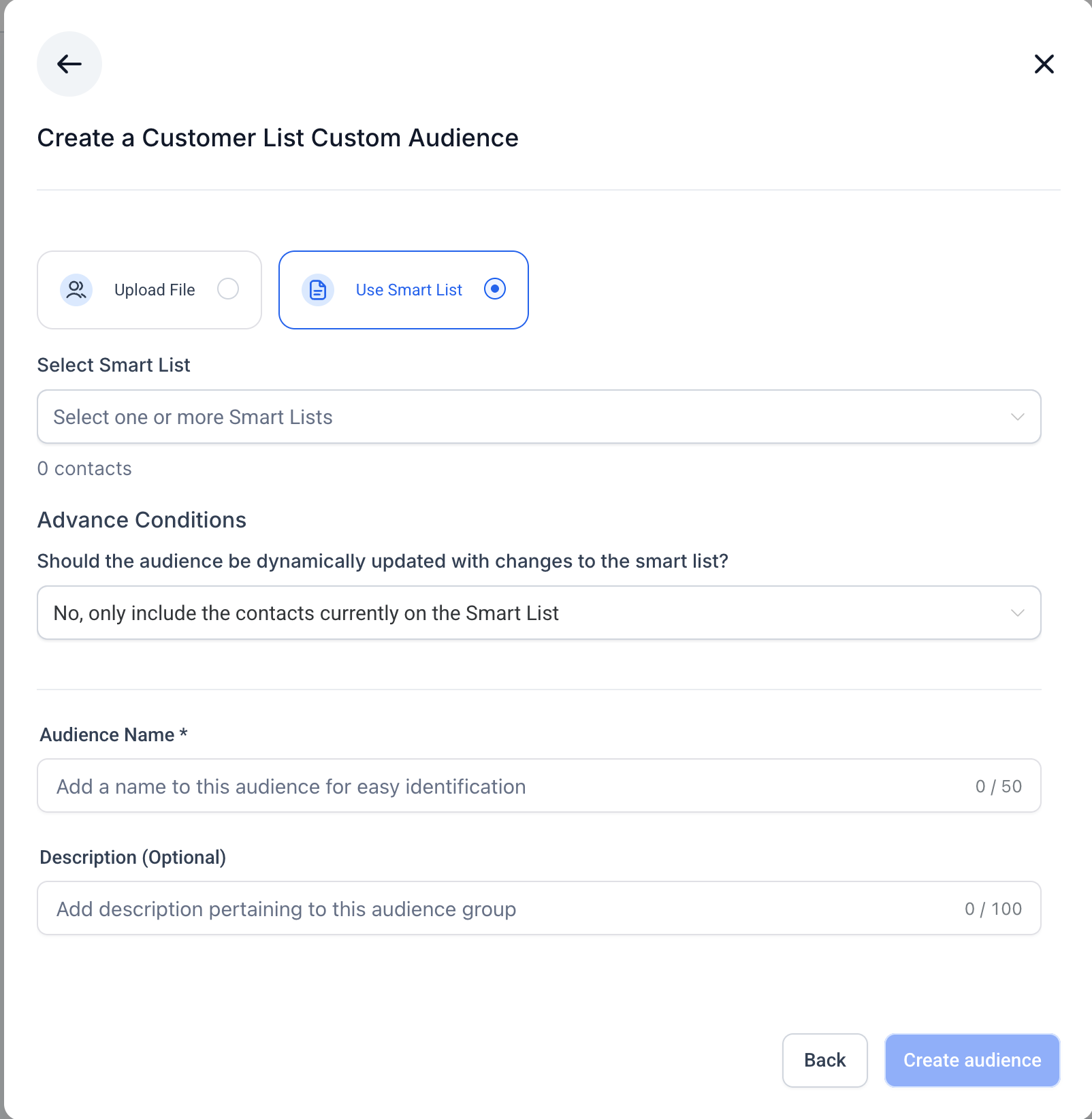
- How to create a Customer List Custom Audience?
- Related Articles
Where to find the option to create custom audiences?
An option to create custom audiences can be found:
In the campaign creation flow, the second step is about 'Budget and Audience', under Audience Controls section we have the Intended Audience section.Under the Retargeting tab, when you click on the dropdown to 'Create new or select retargeting audience', the first option in the list is to "Create a Custom Audience"


How to create a custom audience?
This type of target audience refers to a group of people who are familiar with your brand/product and have interacted with it earlier at some point in any of the Meta platform. We will be using custom audience curated especially to target these set of people with our ad campaign.
Creation of a custom audience is a two step process, both the steps are listed as follows:
- On clicking the 'Create a Custom Audience' button, a modal dialog opens up allowing users to select a custom audience source that will be used to create a custom audience depending on the source selected.

- Once a source is chosen and user clicks on 'Next', they will be navigated to the second step of custom audience creation and a dialog is presented with its constituents depending on which source is selected.Ex: If 'Website' is selected, the second step to create a custom audience will look like -Pixel:The list of all the pixels that exists within HL Ad Manager will be shown in the dropdown and one of them can be selected.Events:Choose the event you want to be considered as the pivot for your audience creation. There are two options:1. All website visitors - It refers to all the people who have visited or interacted with your website.2. Visitors by time spent - It refers to the people who have spent the most time on your website and can be further narrowed down by selecting a percentile.Exampleon how to use percentile: If I select 10% then that means the audience which will be used for consideration will include the the visitors who were in the 10% of time spent on your website.Audience retention:It refers to the number of days users will remain in your audience after they have interacted with your content. In case of Website audience, 30 days is the maximum allowed limit.Note:Additionally, four more clauses can be added similar to the one described above with the condition for them to be included along with the default clause or excluded by clicking on the 'Include more people' and 'Exclude people' respectively.Add anaudience nameanddescriptionfor easy distinction.


How to create a Website Custom Audience?
All the details related to creating a Website custom audience is explained in the above section as an example.
How to create a Facebook Page Custom Audience?
By selecting the 'Facebook Page' as the custom audience source from the first stepper dialog, users can proceed to create an audience of people who follow or have interacted with your page and proceed to define the audience specifics in the second step.

Page:The list of all the pages that are integrated with Ad Manager will be shown in the dropdown and one of them can be selected.
Events:Choose the event you want to be considered as the pivot for your audience creation. There are 7 options in the dropdown list of events out of which one can be selected.
Audience retention:It refers to the number of days users will remain in your audience after they have interacted with your content. In case of Facebook Page audience, 365 days is the maximum allowed limit.
Note:Additionally, four more clauses can be added similar to the one described above with the condition for them to be included along with the default clause or excluded by clicking on the 'Include more people' and 'Exclude people' respectively.
Add anaudience nameanddescriptionfor easy distinction.
How to create a Lead Form Custom Audience?
By selecting the 'Lead Form' as the custom audience source from the first stepper dialog, users can proceed to create an audience of people who have opened or completed a form in one of your lead generation ads on Facebook or Instagram and proceed to define the audience specifics in the second step.

Events:Choose the event you want to be considered as the pivot for your audience creation. There are 3 options in the dropdown list of events out of which one can be selected:1. Users who opened and submitted form2. Users who opened but didn't submit form
3. Anyone who opened the form
Page:The list of all the pages that are integrated with Ad Manager will be shown in the dropdown and one of them can be selected.
Lead form:Based on the page selected, all the lead forms associated with the selected page will be present as part of the lead form dropdown list and one can be selected. This is the form which will be considered to curate audience who've interacted with this form.
Audience retention:It refers to the number of days users will remain in your audience after they have interacted with your content. In case of Lead Form audience, 90 days is the maximum allowed limit.
Note:Additionally, four more clauses can be added similar to the one described above with the condition for them to be included along with the default clause or excluded by clicking on the 'Include more people' and 'Exclude people' respectively.
Add anaudience nameanddescriptionfor easy distinction.
Note: Once a custom audience is successfully created, it will be shown as part of the Retargeting Audience dropdown list and can be used for creating a campaign once the status of the newly created audience isready.
How to create a Customer List Custom Audience?
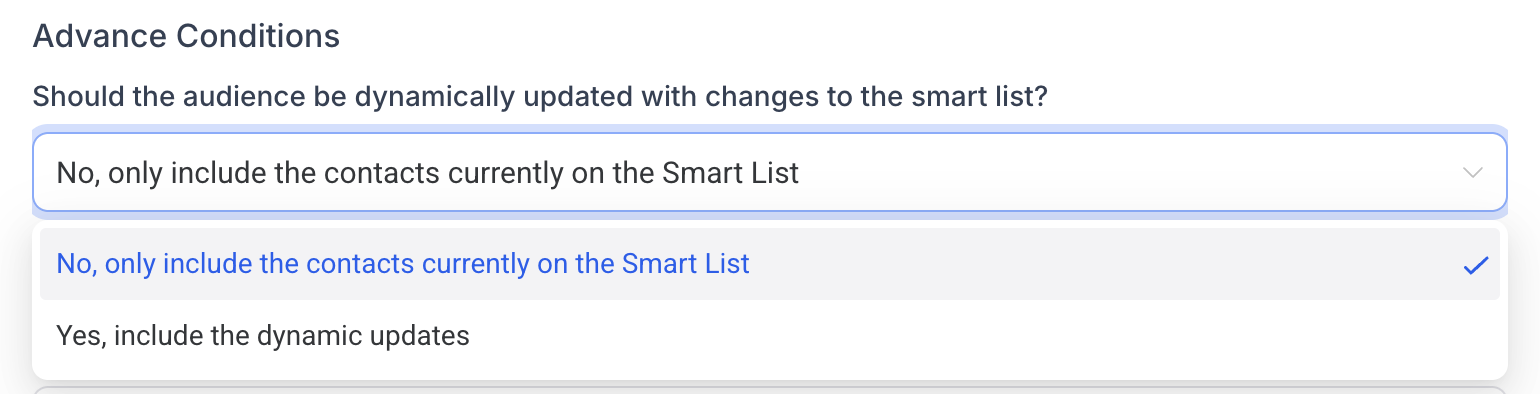
By selecting ‘Customer List’ as the custom audience source from the first stepper dialog, users can choose CSV Upload or Smart List and proceed to define audience specifics in the second step.
A Meta Customer List Custom Audience lets you use your own customer data (emails, phone numbers, etc.) in Ad Manager to reach specific individuals on Facebook and Instagram. The data is matched to user profiles so you can deliver targeted ads.
Related Articles
- How to create Customer List Custom Audience?
How to create Customer List Custom Audience?
- Create lookalike audiences in Ad Manager
Create lookalike audiences in Ad Manager
- Audiences Tab Overview - Ad Manager Settings
Audiences Tab Overview - Ad Manager Settings
- Ad Manager: Audience controls
Ad Manager: Audience controls