
Como Gerenciar Payouts e Comissões de Afiliados
Affiliate payouts are the amounts distributed to affiliates for each sale made through their efforts. This article will guide you through how commissions are tracked and how to manage payouts efficiently within the Affiliate Manager.
TABLE OF CONTENTS
- Key Points to Note:
- How to Navigate the Payouts Tab
- How Are Payouts Generated?
- How Do Commissions Work?
Key Points to Note:
- Commission Tracking: Commissions are tracked through sales processed viaStripe. However, the system does not automatically track refunds for one-time products or subscriptions.
- Subscription Cancellations: The Affiliate Manager administrator can choose to issue payments15, 30, or 60 days after the saleto allow enough time to handle potential cancellations. If a subscription is canceled, the lead is moved to thechurned categorybut can be re-activated later.
- One-Time and Recurring Commissions: Commissions can be one-time or recurring, depending on the product sold through Stripe.
- Coupons and Discounts: If a discount is applied during checkout, the commission is calculated based on thediscounted amount.
Payout Terms
Payout terms let you set a delay between when a commission is earned and when it’s paid out — ideal for businesses with refund windows. For example, if you offer 30-day refunds, you can set a NET-30 payout to ensure commissions are only paid after that period.
Supported Payout Terms:
- NET-7 – 7 days after month end
- NET-15 – 15 days after month end
- NET-30 – 30 days after month end
- NET-45 – 45 days after month end
- NET-60 – 60 days after month end
- NET-90 – 90 days after month end
You can configure payout terms in:
- Campaign > Additional Settings
- Global Settings
- Affiliates can view the payout term inside their portal.
How to Navigate the Payouts Tab
When you access thePayoutsscreen, you'll see four sub-tabs representing different payout statuses:
- Pending:Displays all pending payouts for each campaign, organized month-wise.Affiliate owners review and approve eligible affiliate payouts by clicking on the three dots to see the breakdown at the campaign and month levels.If a payout isn’t applicable, the owner can selectDeny Payout, moving the entry to the "Denied Payout" tab.
- Displays all pending payouts for each campaign, organized month-wise.
- Affiliate owners review and approve eligible affiliate payouts by clicking on the three dots to see the breakdown at the campaign and month levels.
- If a payout isn’t applicable, the owner can selectDeny Payout, moving the entry to the "Denied Payout" tab.
- Approved for Payout:Once payouts are approved in the Pending tab, they move here. The affiliate owner can export the list of affiliates and their owed amounts, upload it to the payment gateway, and mark the payouts as "Paid" once the payment is processed.You can also move a payout back toPendingif needed.
- Once payouts are approved in the Pending tab, they move here. The affiliate owner can export the list of affiliates and their owed amounts, upload it to the payment gateway, and mark the payouts as "Paid" once the payment is processed.
- You can also move a payout back toPendingif needed.
- Paid:Lists all affiliates who have received their payouts, along with the transaction date. Payouts in this tab cannot be modified—this is the final status.
- Lists all affiliates who have received their payouts, along with the transaction date. Payouts in this tab cannot be modified—this is the final status.
- Denied Payouts:If a payout is denied, it will appear here. Payouts can be denied from thePendingorApproved for Payouttabs.
- If a payout is denied, it will appear here. Payouts can be denied from thePendingorApproved for Payouttabs.
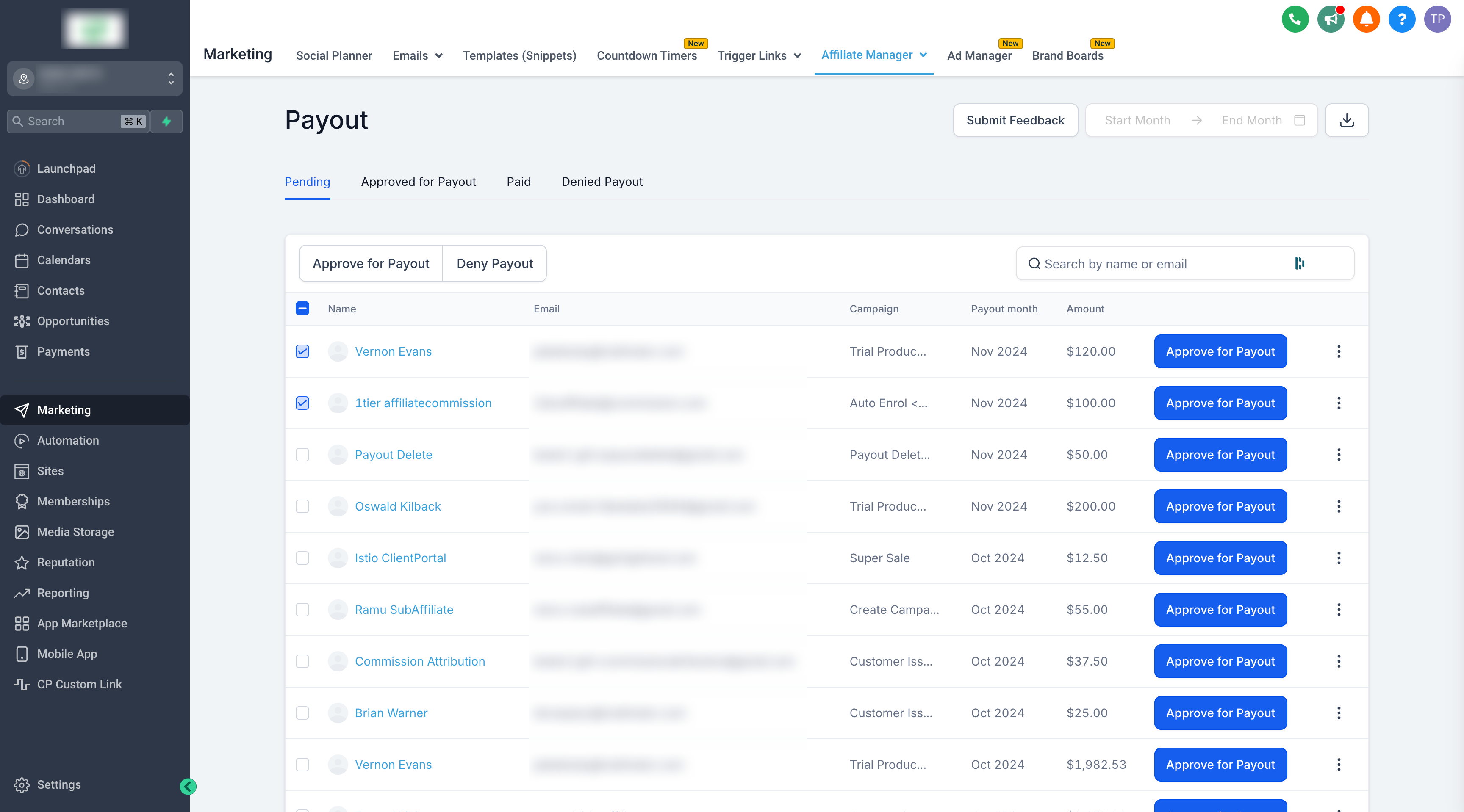
How Are Payouts Generated?
Payouts are generated in thePendingtab on the1st of every month. Each payout shows a "Due" date, reflecting when the affiliate should be paid, based on the terms set in the campaign configuration.
This system provides flexibility by allowing payouts to be approved and paid at a later date, accommodating potential issues such as refunds.
How Do Commissions Work?
Commissions are the foundation of payouts. Affiliates earn a commission whenever a sale is made through their unique link. The percentage of commission an affiliate earns depends on the campaign they are promoting.
Understanding how commissions are tied to affiliate payouts ensures smooth payout management and transparency in affiliate marketing efforts.
With these steps, you'll be able to efficiently track, manage, and complete payouts for your affiliates while ensuring all commission terms are accurately followed.
What's Next:
- What Payment Gateways supported in Affiliate manager for Product Sales?
- How to pay your Affiliates
- How to Set Up and Pay Affiliates Using PayPal Auto Payouts