
Anúncios no Instagram: Visão Geral
In order to give users the option to publish their ad campaigns on Instagram too, we have added the option to either add their own Instagram professional account or use the connected FB page to publish ad campaigns on Instagrams too.
TABLE OF CONTENTS
- How is using Instagram ads along with Facebook ads beneficial?
- How can I connect Instagram account with Facebook page?Step 1: Switch to an Instagram Business or Creator AccountStep 2: Connect Instagram to Your Facebook PageStep 3: Verify the Connection in Meta Business SuiteFinal Check:
- Step 1: Switch to an Instagram Business or Creator Account
- Step 2: Connect Instagram to Your Facebook Page
- Step 3: Verify the Connection in Meta Business Suite
- Final Check:
- How to Publish ads on Instagram?
- Reporting of Instagram ads
- How to delink an Instagram account from a Facebook page?
How is using Instagram ads along with Facebook ads beneficial?
UsingInstagram adsalongsideFacebook adsallows businesses to reach a broader, more diverse audience by leveraging the unique strengths of each platform. Instagram targets a younger, visually-driven audience, while Facebook has a broader age range. Combining both maximises visibility and engagement through different ad formats, such as Stories on Instagram and Carousel Ads on Facebook.
The cross-platform targeting enables retargeting, increasing conversion opportunities, and the unified Ad Manager makes campaign management and analytics more efficient. Overall, using both platforms enhancesaudience reach,engagement, andad performance.
How can I connect Instagram account with Facebook page?
Below is the step-by-step guide to Connect Your Instagram Account to a Facebook Page to run ad campaigns. To run ads on Instagram via Ad Manager, you must connect your Instagram Business Account to your Facebook Page. Once the Instagram account is connected to Facebook page, it will automatically be selected whenever the Facebook page is chosen to publish an ad.This setup is to be done from the Meta platform.
Step 1:Switch to an Instagram Business or Creator Account
Note: Skip this step if your Instagram is already a Business Account.
- Open Instagram App and go to your profile.
- Tap the ☰ Menu (top right) to land on Settings and activity.
- Scroll down and tap Account type and tools → Switch to professional account.
- Choose Business (recommended for ads) or Creator.
- Select your Business Category (e.g., E-commerce, Health & Wellness).
- Tap Next, and follow the prompts to complete the setup.
Step 2:Connect Instagram to Your Facebook Page
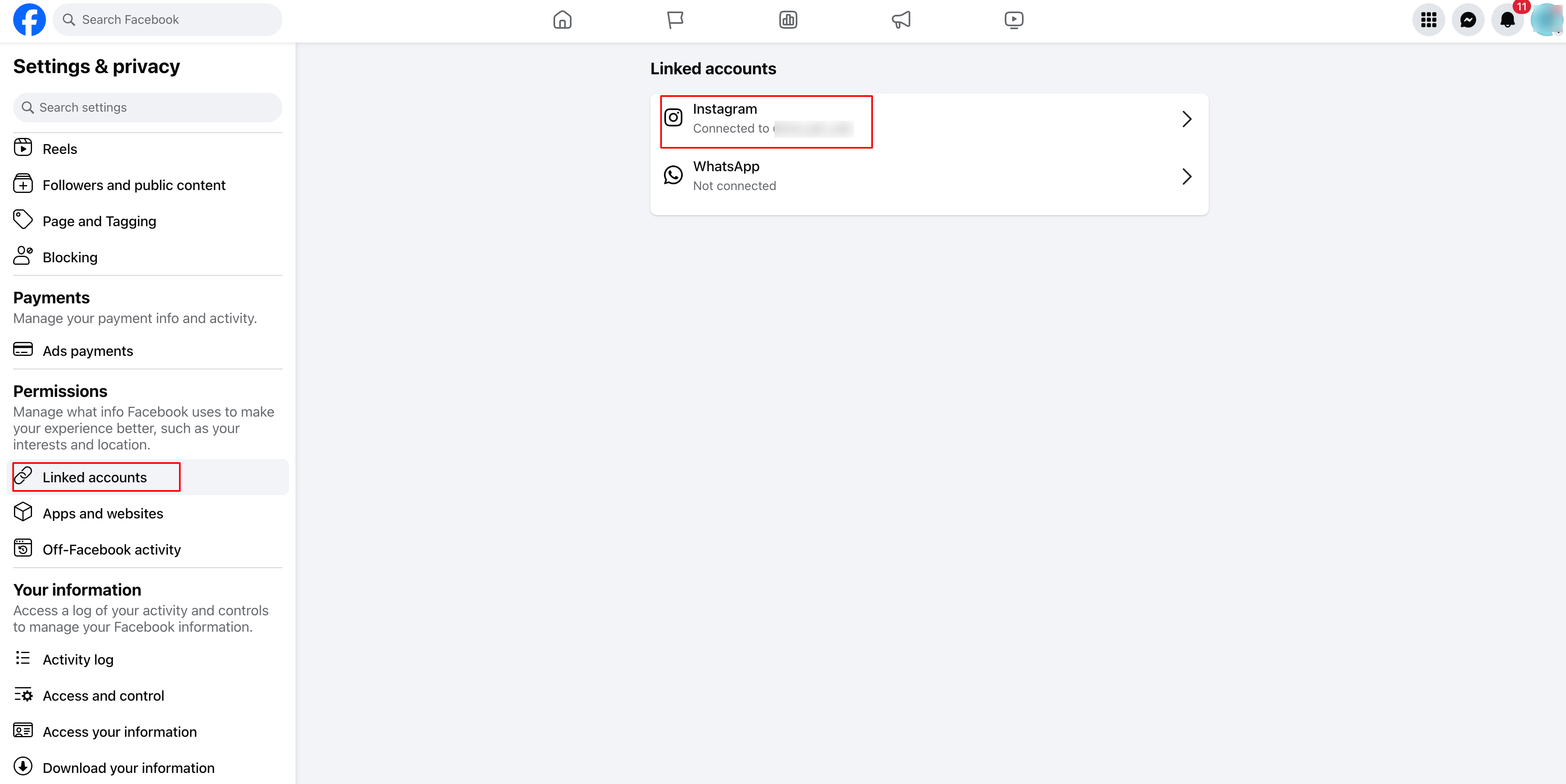
A:Via Facebook Page Settings (Recommended)
- Go to Facebook and open your Business Page.
- Click Settings (left sidebar).
- Select Linked Accounts → Instagram.
- Click Connect Account and log in to your Instagram account.
- Ensure the option Allow Access to Messages & Connected Experiences is enabled.
- Click Confirm to complete the connection.
B:Via Instagram App(this option will be available if you have a professional account)
- Go to your Instagram Profile.
- Tap Edit Profile → Scroll to Public Business Information.
- Tap Page → Connect or Create a Facebook Page.
- Select your existing Facebook Page or create a new one.
- Tap Done to save changes.
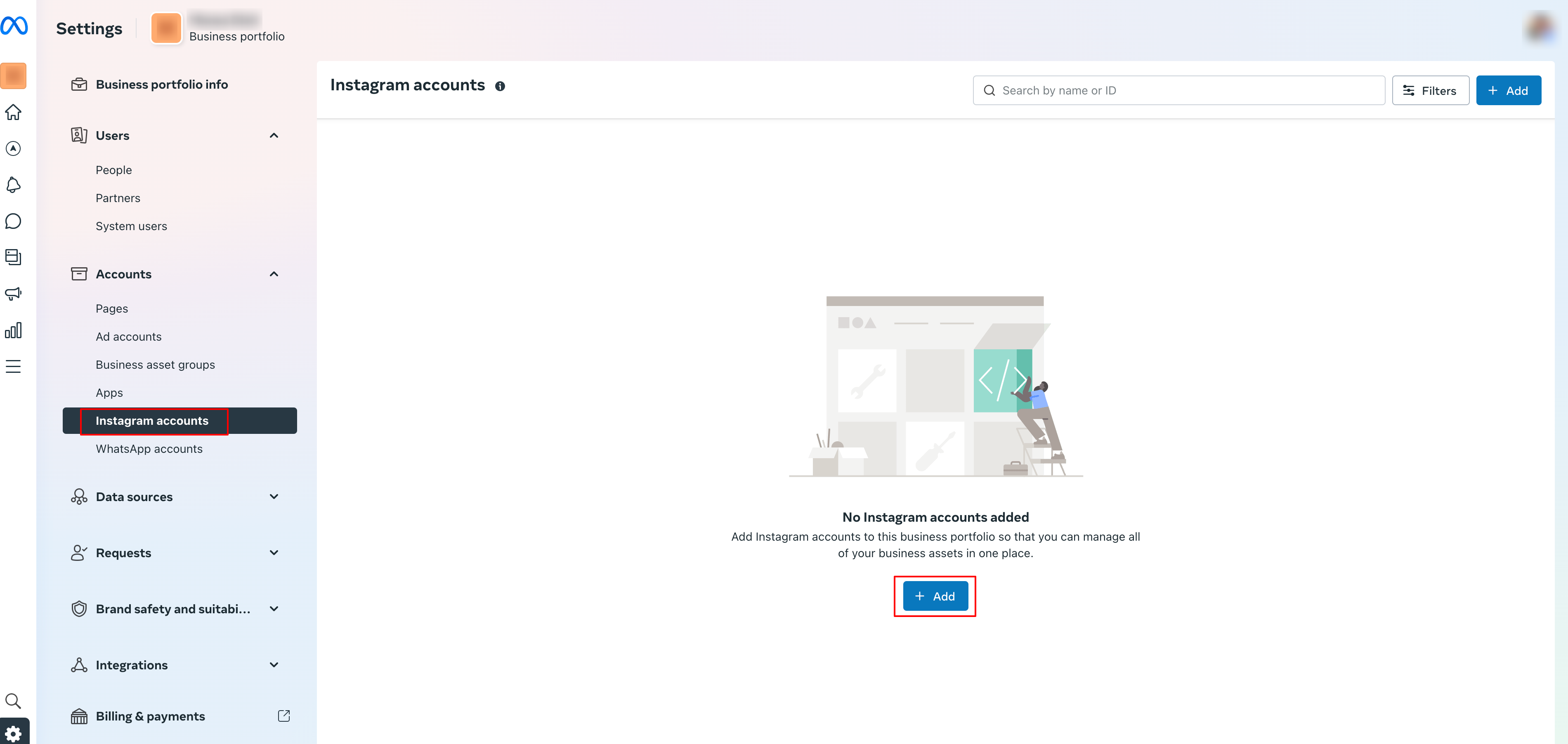
Step 3:Verify the Connection in Meta Business Suite
- Open Meta Business Suite (business.facebook.com)
- Click Settings → Instagram Accounts.
- Your Instagram account should be listed.
- If not, click Add Instagram Account and follow the login steps.
Final Check:
✔ Instagram is set as a Professional Account.
✔ Connected to the correct Facebook Page.
✔ Verified in Meta Business Suite.
You’re now ready to publish ads!
Note:Only one Instagram account can be connected to a Facebook page.
How to Publish ads on Instagram?
On the Ad Manager home page, click on 'Create Campaign' and proceed to create a Meta Ad campaign. Below are the steps to create an ad campaign using Instagram as placement:
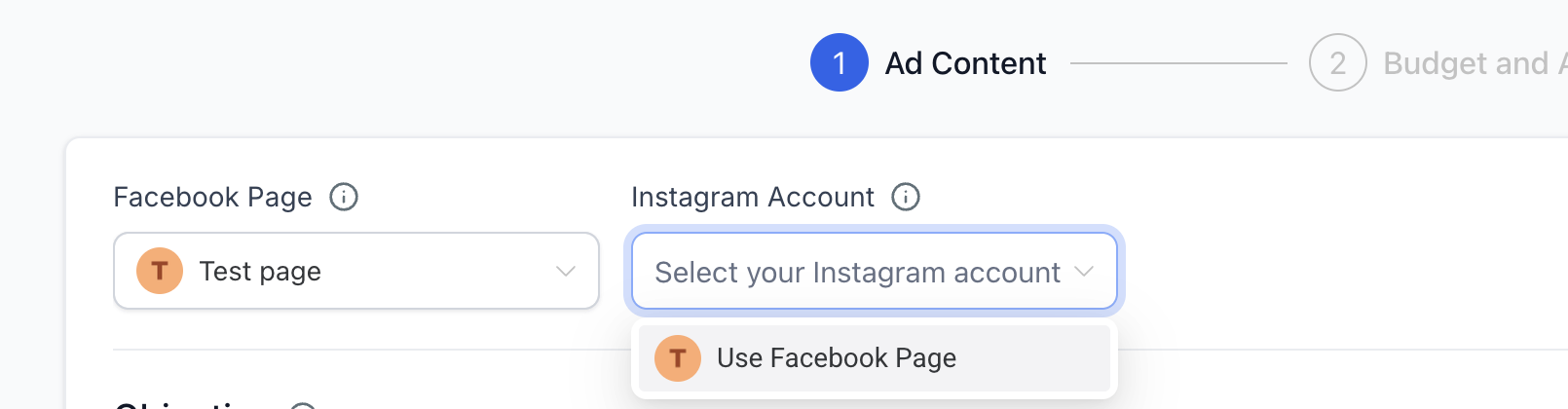
- Select a desired Facebook page (default Facebook page will be selected and can be changed)
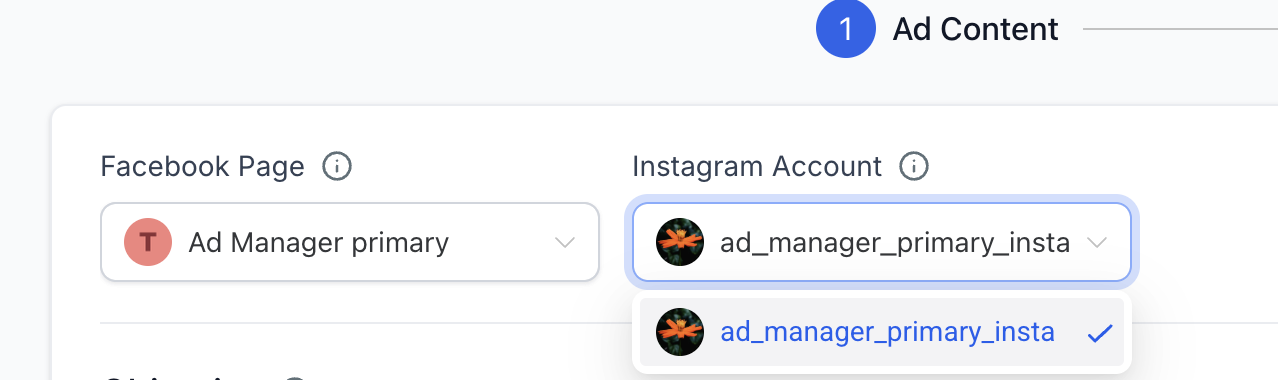
- Select the Instagram account you want to use to publish ad. There will be two cases while selecting an Instagram account:A:If no Instagram account is connected to the selected Facebook page, user can select "Use Facebook page" from the Instagram account dropdown and your Instagram ad will use the name, profile picture and other details from your Facebook Page.B:If user already has an Instagram account linked to the selected Facebook page, then that account gets automatically selected and will be used to publish ad campaign on Instagram.
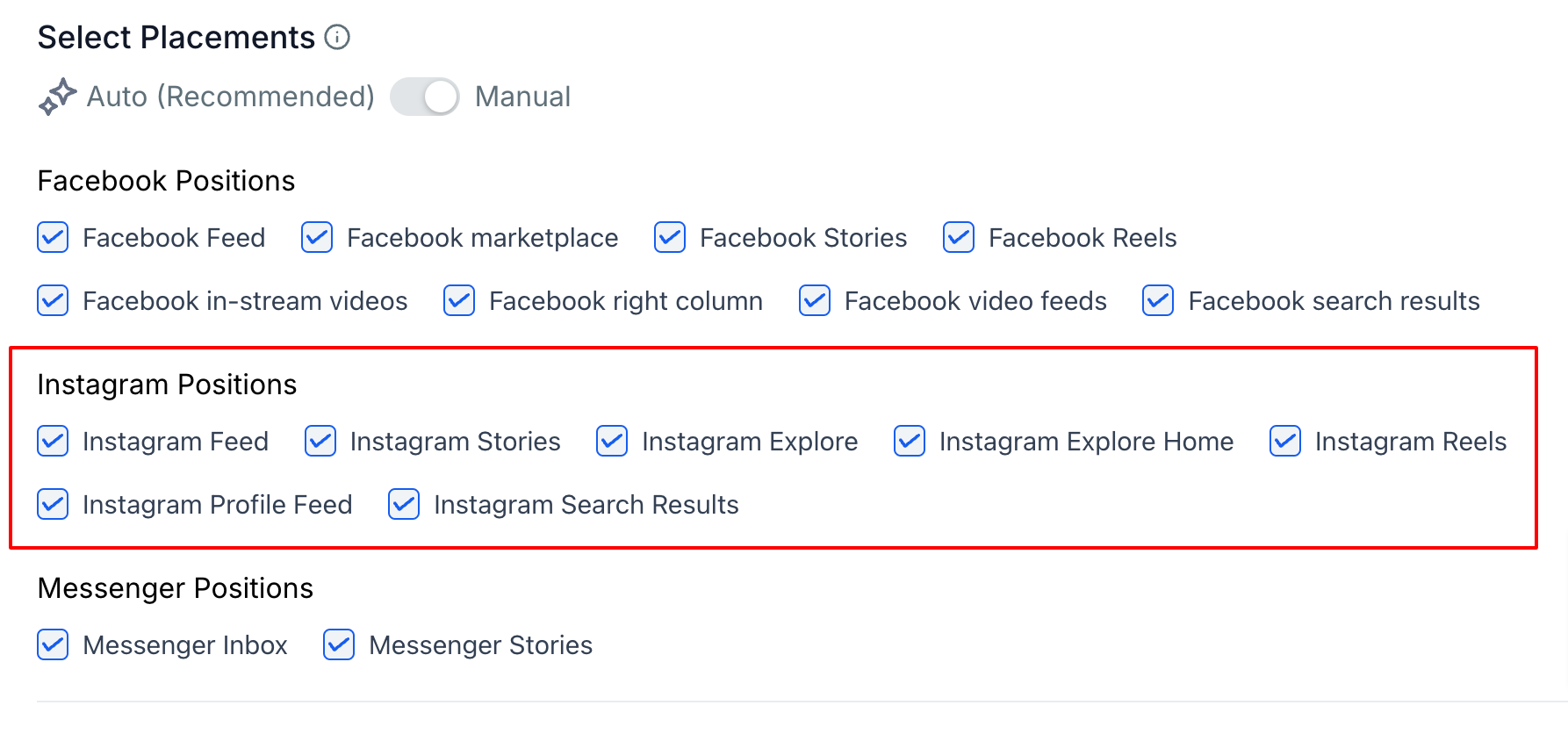
- All the placements of Instagram are shown in the manual placement section and user can select the ones which they want as their ad placement. When the placements are Auto, all are selected for Instagram.
- Proceed with adding the ad text & media, budget, audience and other details for your ad campaign and hit publish to reach your ad audience both on Facebook and Instagram.
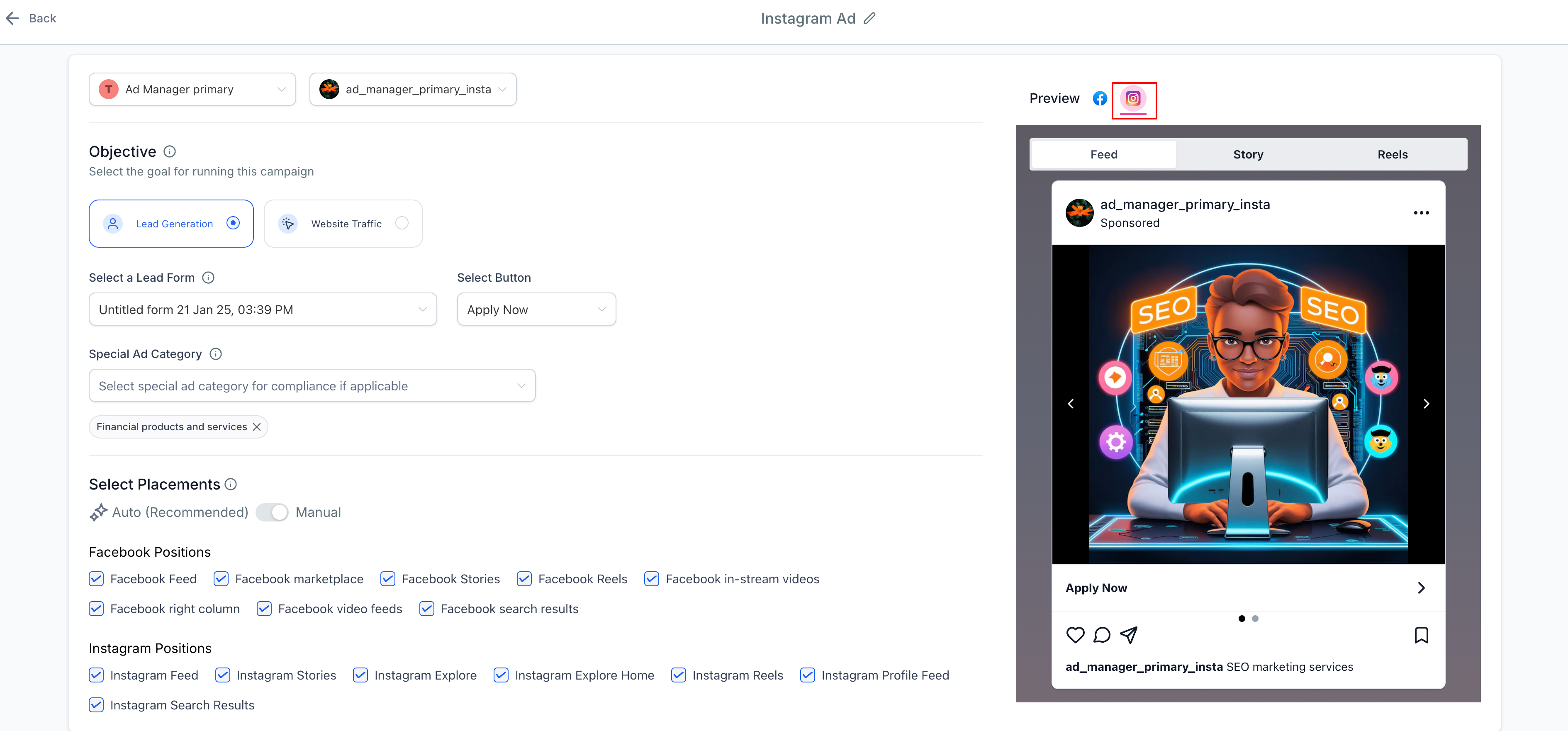
- A preview of how your ad will look on Instagram can be checked in the preview window and selecting the Instagram tab.
Reporting of Instagram ads
Like Facebook ads, performance metrics for Instagram ads will be available in HL Ad Manager shortly after your Instagram ads begin running. Instagram ads will use the same reporting tools i.e. the statistics section that Facebook ads use and combined metrics are shown. You'll be able to look at the metrics at the overall and individual campaign level.
Learn more about Ad Manager Statistics using thishelp article.
How to delink an Instagram account from a Facebook page?
User connects an Instagram Business account; when they do so, that particular Instagram account gets linked to the FB page and every time the Facebook page is used to publish ads, we see the Instagram account automatically selected. Now, considering the fact that user wants to delink this Instagram account from the connected Facebook page and connect it to a different page.
One can do so by referring the following help article by Meta:Connect or disconnect an Instagram account and your Page