
Tarefas em Múltiplos Objetos
Manage follow-ups where the work really happens. Multi-Object Task Associations let you link a single task to Contacts, Opportunities, Companies, and Custom Objects—up to ten records of each type—so your team never loses context again.
TABLE OF CONTENTS
- What is Multi-Object Task Associations?
- Key Benefits of Multi-Object Task Associations
- Default Association Behavior
- Viewing Associated Objects
- Filtering Tasks by Association
- How To Setup Multi-Object Task Associations
- Frequently Asked Questions
- Related Articles
What is Multi-Object Task Associations?
Multi-Object Task Associations is an enhancement to HighLevel Tasks that removes the previous “contacts-only” limitation. You can nowconnect one task to multiple objects—contacts, deals, companies, or any custom object—giving every stakeholder instant visibility into the same to-do item. This foundation supports true cross-object task management and cleaner data by letting you attach tasks exactly where they belong.
Connect a Task with up to 10 associations per Object type. That means one Task can be connected to 10 Contacts, and 10 Opportunities, and so on.
Key Benefits of Multi-Object Task Associations
Multi-Object Task Associations helps teams stay organised and accountable by:
- End-to-end visibility – the same task shows inside each linked record’s Associated Objects panel.
- Cross-team collaboration – sales, success, and operations can all follow the same action item, even if they work in different modules.
- Less duplication – one task replaces multiple “clone tasks” that previously had to be created for every record.
- Flexible limits – associate up to 10 contacts, 10 opportunities, 10 companies, and 10 custom objects with a single task.
- Powerful list filters – quickly narrow task lists by assignee, status, or any linked Contact or Opportunity.
Default Association Behavior
HighLevel applies smart defaults to save you clicks while still giving you full control.
- Taskspage ➜ starts withnoassociations; pick whatever records you need.
- From aContact➜ pre-links thatcontactplus itsprimary company(if any).
- From anOpportunity➜ pre-links theopportunity, itsprimary contact, and thatcontact’s primary company.
- From aCompany➜ pre-links thecompany.
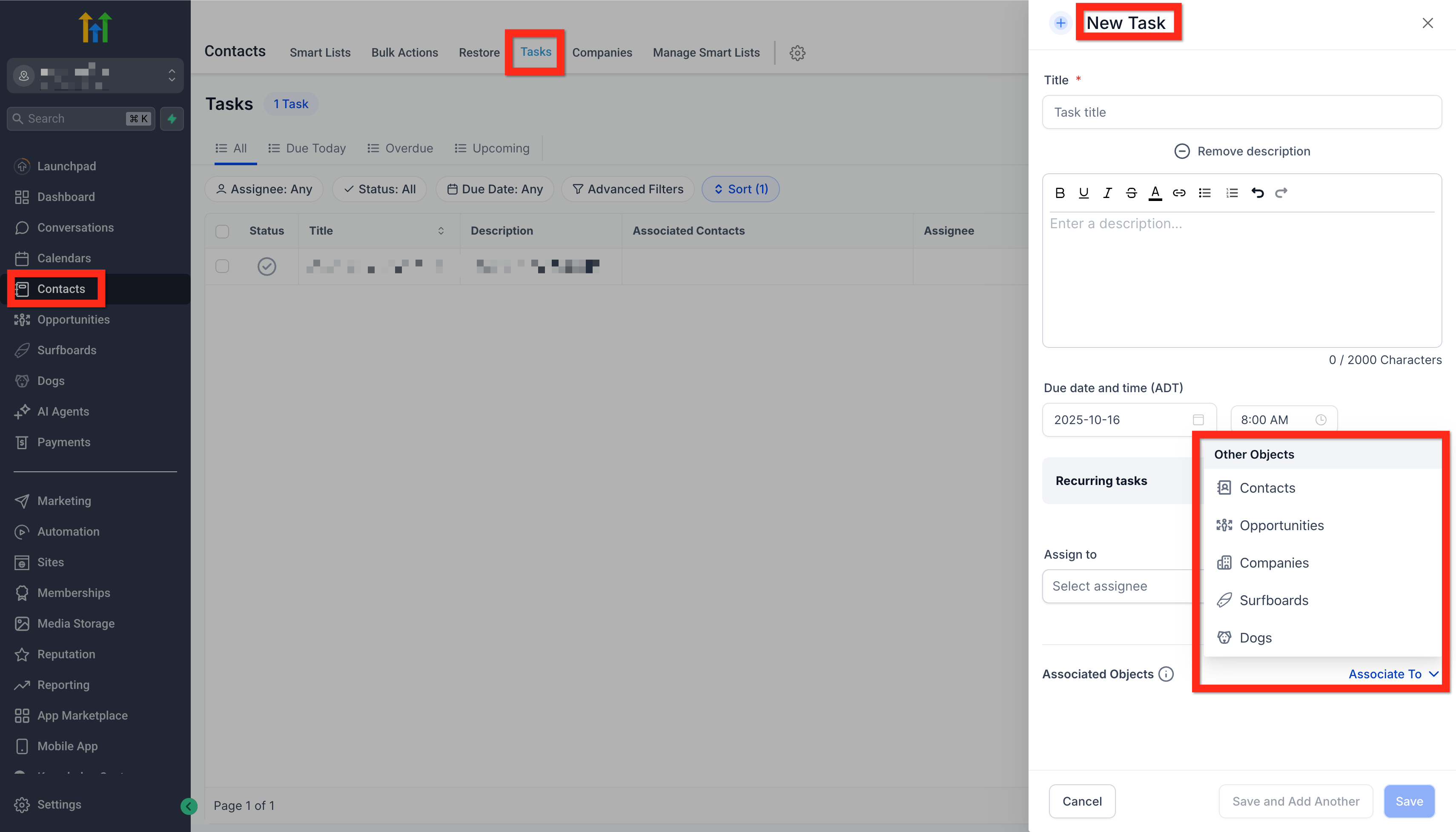
Edit, add, or remove associations at any time using the Associate To drop-down.
Viewing Associated Objects
Every Contact, Opportunity, Company, and Custom Object record now includes an “Associated Objects” section. Hover the chain-link icon in any task row to preview all linked records instantly. Click any record name to open it in a new tab.
Filtering Tasks by Association
Use the filter icon on the Tasks page or inside a record’s task panel to:
- Show only tasks linked to a specific Contact or Opportunity.
- Combine filters with status (Open, Completed, Overdue) and assignee for laser-focused lists.
These filters pull from the same association data that powers the new feature, so you can slice and dice tasks any way your workflow demands.
How To Setup Multi-Object Task Associations
Proper setup ensures tasks appear everywhere your team expects them.
- Navigate to any Contact, Opportunity, Company, Custom Object—or open the main Tasks page.
- Click + Add Task.
- Confirm or modify the default associations in the Associate To field.
- (Optional) Click + Add Association to link additional records—up to 10 per object type.
- Complete the rest of the task form (title, assignee, due date, etc.).
- Click Save.
- To edit associations later, open the task, click the pencil icon next to Associated Objects, adjust, and Save.
Frequently Asked Questions
Q: Does this affect existing tasks?
A: No. Tasks created before the release remain linked to their original contact only. You can edit them to add more associations.
Q: Is there a way to exceed the 10-per-object-type limit?
A: The limit is enforced platform-wide to keep data manageable. For larger projects, consider splitting work into multiple tasks.
Q: Can I automate associations in Workflows?
A: Not yet. Associations are currently managed in the UI, but workflow actions for tasks are on the product roadmap.
Q: Will recurring tasks respect the same associations?
A: Yes. When a recurring instance is generated, it inherits all associations from the original task.
Q: Do permissions follow object ownership?
A: A user can see a task if they have access to any one of the associated records.
Related Articles
- Unified Task Management Across Contacts and Opportunities
- Association Limits
- How to Decouple Owners for Contacts and Opportunities
- Opportunity Notes – Link Notes Across Contacts & Opportunities