
Como ter seu número de telefone aprovado para A2P em 2026
A2P 10DLC registration is a process used by U.S. cellular carriers (e.g. Verizon, AT&T, T-Mobile, etc) to verifywhois sending SMS (text messages) andwhatis being sent to their customers. This helps ensure your contacts are receiving message they actually want to receive. Follow these guidelines to avoid A2P rejections, save time and easily stay compliant!
TABLE OF CONTENTS
- Overview of A2P RegistrationOpt-In FormCampaign Use: Case Descriptions vs. Opt-in FormsUniversal Footer RequirementsPrivacy Policy EssentialsTerms of Service ClausesSample Privacy Policy and Terms & Conditions PagesDoing Business As (DBA) RequirementsUsing a Subdomain for A2P RegistrationHow to Get SupportRelated Articles
- Opt-In Form
- Campaign Use: Case Descriptions vs. Opt-in Forms
- Universal Footer Requirements
- Privacy Policy Essentials
- Terms of Service Clauses
- Sample Privacy Policy and Terms & Conditions Pages
- Doing Business As (DBA) Requirements
- Using a Subdomain for A2P Registration
- How to Get Support
- Related Articles
Overview of A2P Registration
A2P 10DLC registration is amandatory carrier requirementfor businesses sending application-to-person (A2P) SMS traffic in the United States. Registration is enforced by U.S. cellular carriers to verify sender legitimacy, consent integrity, and message transparency. Follow the guidelines in this article to get approved and stay approved.
Opt-In Form
Whether a phone number field ismandatory(marked as required) oroptionalin a form, survey, quiz, web chat widget or calendar booking, users cannot be forced to agree to SMS messaging in order to submit. The phone field and consent choices are separate decisions.
When collecting a phone number via a opt-in form, apply the rules below:
StrictSeparationbetween Marketing vs Non-Marketing Messages
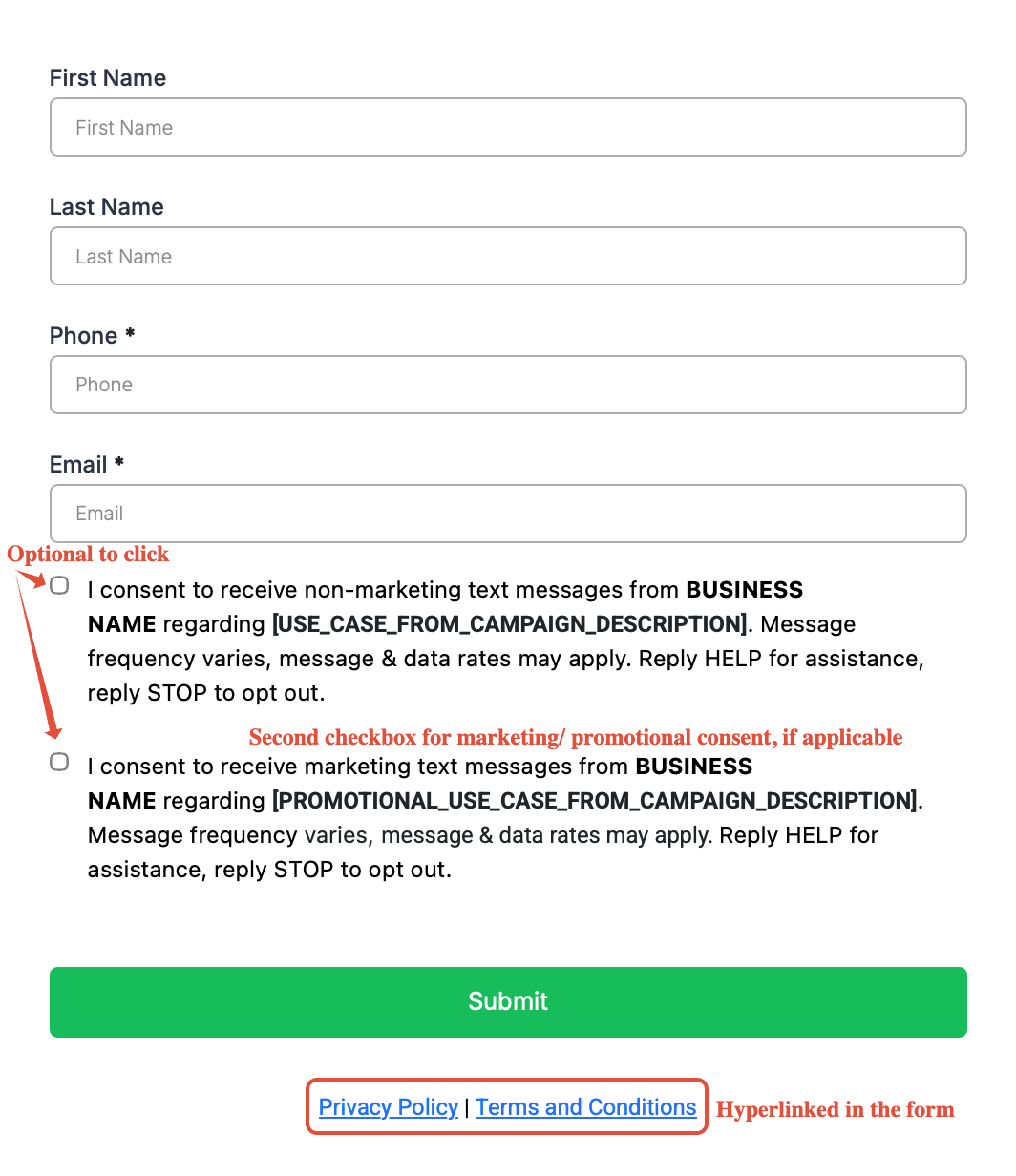
Consent checkboxes must be distinct for Marketing messages vs. Non-Marketing messages so subscribers can opt into one, both, or neither. Make sure you have two checkboxes with the following exact messages:
- "I consent to receivemarketing text messages, about special offers, discounts, and service updates,from[BUSINESS NAME]at the phone number provided. Message frequency may vary. Message & data rates may apply. Text HELP for assistance, reply STOP to opt out."
- "I consent to receive non-marketing text messages from[BUSINESS NAME]about[USE_CASE_FROM_CAMPAIGN_DESCRIPTION]. Message frequency may vary, message & data rates may apply. Text HELP for assistance, reply STOP to opt out."
[BUSINESS NAME]should match what’s on the CP 575/147C Document.
Note for DBAs:If you have an EIN for your company but you want to use a different brand name for your messages, be sure to follow the guidelines for DBA.Click here for more information on DBA for A2P Registration
No Pre-Selection of Checkboxes
Consent checkboxes cannot be pre-selected by default. The users must manually select the consent checkboxes that they would like to agree to.
Important:Never default a checkbox to "Checked". The user must take affirmative action.
Consent Checkboxes are Always Optional
Even if the phone number is required, checking the consent boxmust remain optional for submission.Submitting a form (even with a phone number) cannot be conditional on marketing consent.
After submission, you must execute the communication channels based on their consent checkbox selections only.
Footer Links
Privacy Policy and Terms and Conditions (TnC) are mandatory requirements within the footer of all forms.
For more information, seeTerms of Service ClausesandPrivacy Policy Essentials.
Example of a Good-Looking Form
Campaign Use: Case Descriptions vs. Opt-in Forms
Campaign descriptions must directly align with consent checkbox language.The message use cases described in the campaign must be explicitly reflected in the opt-in checkbox wording.
- Non-marketing example:If a campaign description includes message types such as appointment reminders, order updates, or service notifications, the consent checkbox must reference those same message types rather than using generic language like “Non-marketing messages”
- Promotional example:If a campaign description includes promotional messages such as “special offers or discounts”, the consent checkbox must reference those same message types rather than using generic language like ”Marketing messages”
The Campaign Description Must Match Business Niche. Twilio reviews whether the website supports the stated use case.Example:A pizza restaurant using an appointment or confirmation reminder use case doesn’t align with their business model.
Universal Footer Requirements
The footers of all forms must include all of the following elements in order to for a A2P submission to be successful:
Privacy Policy
A clear, direct link must be added at the footer of every form.Click here for details on what must be included.
Terms & Conditions (TnC)
A visible link to Terms & Conditions(TnC) must be in the footer.Click here for details on what must be included.
Accessibility
Ensure legal links arenot obscuredby other design elements or pop-ups. These links must be clear and visible.
Transparency
Users must be able to review how their data will be handledbeforeform submission. Ensure yourPrivacy PolicyandTnCare accessible without extra steps.
Privacy Policy Essentials
Privacy Policy and Terms and Conditions must be added at the footer of the form, and it should never talk about affiliation, selling or buying of leads.
Important:Ensure that all contact information in the Privacy Policy and Terms and Conditions match what was submitted in your Brand Registration.
Strict Prohibition
The policy should never mention affiliation, selling, or buying of leads.
Non-Sharing Clause
Your policy must include this exact language regarding third-party sharing.
"No mobile information will be shared with third parties/affiliates for marketing/promotional purposes. Information sharing to subcontractors in support services, such as customer service, is permitted. All other use case categories exclude text messaging originator opt-in data and consent; this information will not be shared with any third parties.”
Terms of Service Clauses
Your Terms of Service must identify the sender, provide opt‑out and support instructions, disclose frequency, and reference your Privacy Policy. Ensure the following clauses are included:
TnC: Business Identity Clause
Clearly insert your business name and a brief description of the messages users can expect. This clause gives users an idea of who you are and what you do.
TnC: Opt-Out & Support Mechanisms
This must cover how users can opt out of messaging and explain how they can get support.
“You can cancel the SMS service at any time. Just text "STOP" to the [Phone Number]. After you send the SMS message "STOP" to us, we will send you an SMS message to confirm that you have been unsubscribed. After this, you will no longer receive SMS messages from us. If you want to join again, just sign up as you did the first time and we will start sending SMS messages to you again. If you are experiencing issues with the messaging program you can reply with the keyword HELP for more assistance, or you can get help directly at [support email address or toll-free number].”
TnC: Carrier Liability Clause
"Carriers are not liable for delayed or undelivered messages."
TnC: Message Frequency Clause
This clause must cover the frequency in which you receive messages as a user.
“As always, message and data rates may apply for any messages sent to you from us and to us from you. You will receive [message frequency]. If you have any questions about your text plan or data plan, it is best to contact your wireless provider.”
TnC: Privacy Policy Link
You must have a cross-link to your privacy policy within the Terms of Service.
“If you have any questions regarding privacy, please read our privacy policy: [link to privacy policy]”
Sample Privacy Policy and Terms & Conditions Pages
We've built sample webpages that include the required language for your A2P registration. Please note that these are not comprehensive and you should therefore always consult with your own legal counsel before publishing to ensure they meet the needs of your business and jurisdiction.
Click here to load sample Privacy Policy + Terms & Conditions pages to your sub-account
Google Doc Versions:
- Click here to view sample Privacy Policy
- Click here to view sample Terms and Conditions
Important:Ensure that all contact information (e.g.,Phone: {{business.phone}}, Email: {{business.email}}, Website: {business.website}}) matches what was submitted in your Brand Registration.
Doing Business As (DBA) Requirements
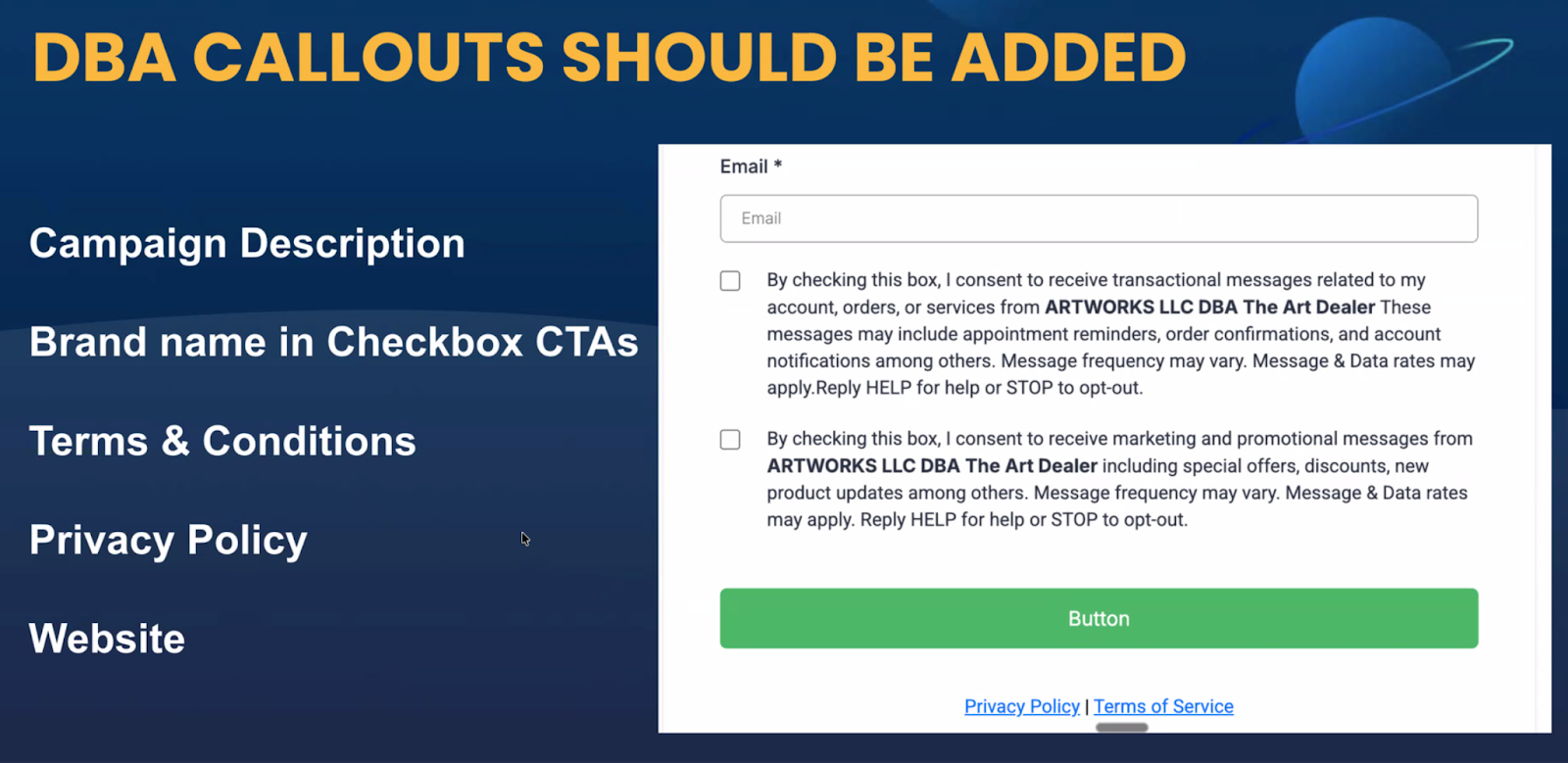
If you have an EIN for your company but you want to use a different brand name for your messages, you can add this sentence "We are doing DBA as [Business_Name]" in the Campaign Use Case Description.Make sure the rest of the submission, including the website, Privacy Policy, T&C, and the business name shown in opt-in form checkboxes, matches the declared[Legal Business Name] DBA [DBA Name].DBAs and other relationshipsmust be VERY clear on the website. The DBA is required outside of the 2 checkboxes and must be included in the footer and/or the header of the webpage. If it's unclear or cannot be found, it can be rejected.
The logos on the website can represent the DBA branding.
Using a Subdomain for A2P Registration
Phone carriers allow subdomains (e.g.form.website.com) for A2P registration, but they need to understand two things:
- How the subdomain relates to the primary brand.If website.com and form.website.com present very different brands, that is going to block campaigns unless the relationship is made very clear.
- How users get to the opt-in page.Simply stating thatform.website.comis where opt-in happens, without showing how people find that page, creates risk of rejection. If the path is clearly shown (for example, email marketing, social posts, paid ads, or navigation from the main site), subdomains are fine. Otherwise it can look like the subdomain exists only as a compliance “front,” which leads to rejections.
Subdomain Readiness Checklist
- Brand Match: Does the subdomain generally match your overall brand (name, logo, look, feel)?
- Discovery Path: Is it obvious how users get to the subdomain (email, social, ads or navigation)?
- CTIA & Use-Case: Does the page have all the right CTIA disclosures, and appropriate use-case?
If all three answers are Yes, you’re good to proceed with A2P registration using the subdomain.
How to Get Support
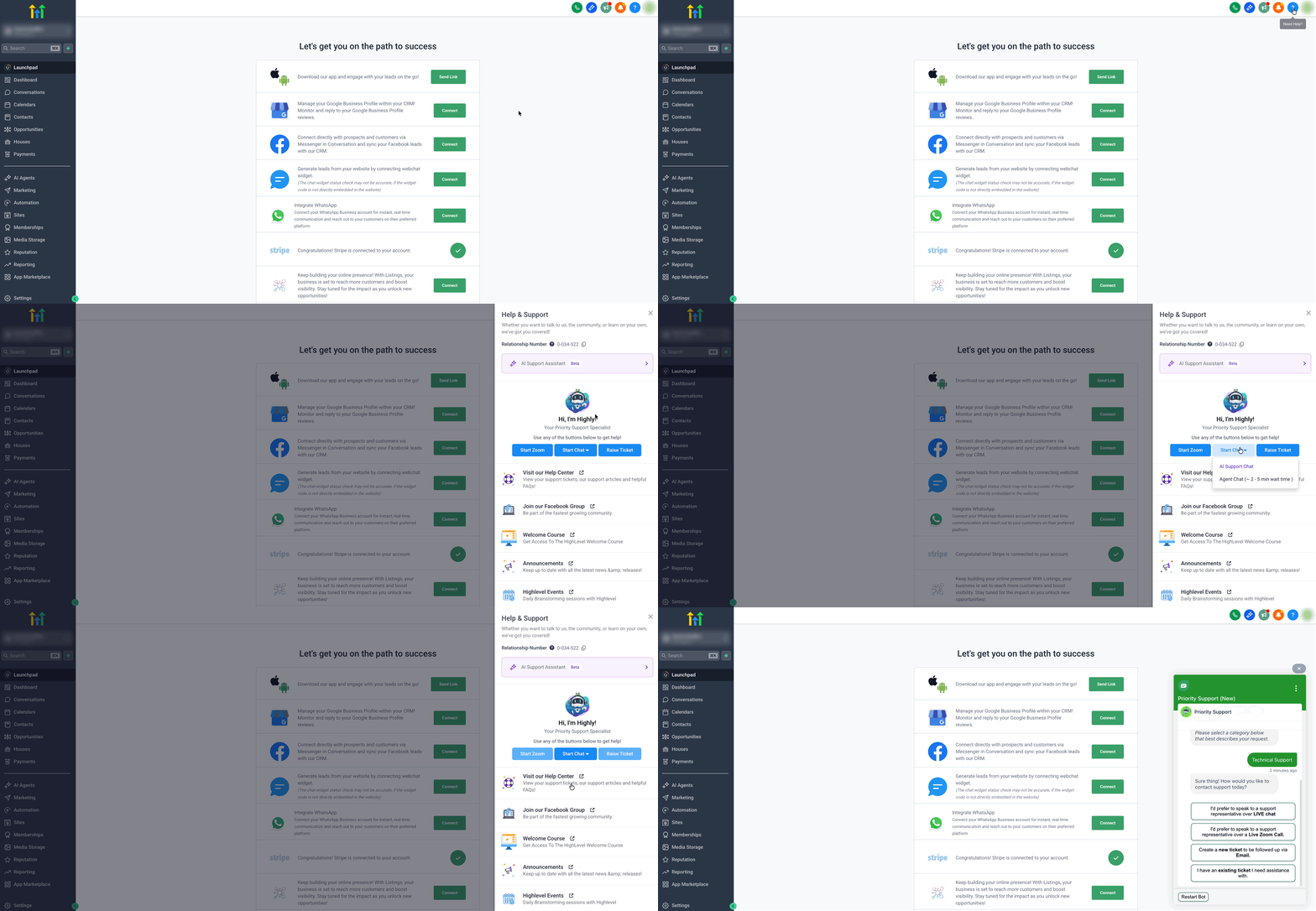
If you need help or have questions about A2P registration, click on the help button and ask for A2P help. Our team is on standby to review all of your submissions!
To reach support, click theHelp (?)button in the upper right corner of the screen then use theStart Chatdropdown to selectAgent Chat.
Related Articles
- What is A2P 10DLC - Brand and Campaign Registration
- Understanding A2P 10DLC Messaging Fees: Registration, Monthly, and Carrier Costs
- A2P Standard Brand Registration for 10DLC
- A2P 10DLC Campaign Rejection Reasons and Resolutions