
A2P - Registro de Marca Standard para 10DLC
To comply with carrier requirements for Application-to-Person (A2P) messaging in the U.S., all businesses using10-digit long code (10DLC) messaging must register their brand. This article explains the process ofregistering as a Standard Brand, which is required for most U.S. based businesses with avalidEIN(Employer Identification Number).
TABLE OF CONTENTS
- What is A2P Standard Brand Registration?
- Key Benefits of Registering as a Standard Brand
- What Are the Requirements for Standard Brand Registration?
- Brand Compliance Checklist (Required for Approval)
- How to Register for A2P as a Standard Brand
- IMPORTANT NOTE
- Handling the "Maximum 3 Tries Exhausted" Error
- Understanding Trust Scores & Throughput
- Frequently Asked Questions
- Related Articles
What is A2P Standard Brand Registration?
A2P messaging refers to any message sent from an application to a person — for example, automated marketing texts or appointment reminders. To send A2P messages in the U.S., youmust register your brand and campaign(s) with The Campaign Registry (TCR)through your messaging provider (e.g., Twilio).
A Standard Brand is designed for businesses registered with an EIN. It allowsgreater messaging throughput and access to a wider variety of campaign use casesthan Sole Proprietor brands.
Note:If your businessdoes not have an EINandonly has one employee per company, you can register for sole prop here:A2P Sole Proprietor Brand Registration for 10DLC
Key Benefits of Registering as a Standard Brand
- Higher message throughput compared to Sole Proprietor Brands.
- Required for LLCs, corporations, and most U.S. businesses.
- Improved trust score potential through EIN verification.
- Enables access to broader campaign use cases.
- Lower chance of carrier filtering or message rejection
What Are the Requirements for Standard Brand Registration?
Before registering, ensure you have the following:
- Business Legal Name (must exactly match IRS records)
- Valid EIN (Employer Identification Number) – U.S. only
- Business Type: LLC, Corporation, etc.
- Business Industry
- Official Business Website
- Business Address
- Business Contact Information
- Authorized Representative’s Name, Title, Email, and Phone Number
Brand Compliance Checklist (Required for Approval)
Before submitting your A2P Brand Registration, verify the following:
Note:Failure to comply with these standards will result in brand rejection by carriers.
- Verify Message CategoryEnsure your campaign does not fall under a Forbidden Message Category:Debt relief, consolidation, and forgiveness programs are prohibited for A2P SMS, even if first-party.Lead Generation and Marketing used to acquire new leads are not allowed (including bought lists, shared databases, or unclear opt-in practices).Promotional campaigns for lending and investment brands are disallowed, even if first-party. These brands may only send transactional notifications.Websites mentioning data sharing with affiliates or third parties will likely be rejected.
- Debt relief, consolidation, and forgiveness programs are prohibited for A2P SMS, even if first-party.
- Lead Generation and Marketing used to acquire new leads are not allowed (including bought lists, shared databases, or unclear opt-in practices).
- Promotional campaigns for lending and investment brands are disallowed, even if first-party. These brands may only send transactional notifications.
- Websites mentioning data sharing with affiliates or third parties will likely be rejected.
- Avoid Deceptive AdvertisingYour website must NOT include:False claims about products or servicesMissing required disclosuresMisleading informationHidden terms in small printUnverified comparative claims
- False claims about products or services
- Missing required disclosures
- Misleading information
- Hidden terms in small print
- Unverified comparative claims
How to Register for A2P as a Standard Brand
Follow these steps carefully to complete your Standard Brand registration:
Step 1:Navigate to Trust Center
- Click onSettingsfrom your sub-account.
- SelectPhone Systemunder Business Services.
- Click on theTrust Centertab.

Step 2:Determine Profile Needs
- Click on theStart Registrationbutton underA2P Messaging (SMS)tab.

- SelectUnitedStatesorCanadafrom the "In which country is your business entity registered?" dropdown.
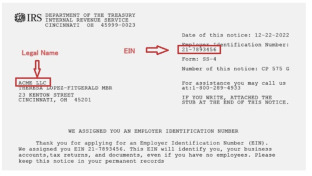
- Select 'Yes, the business I'm registering has a tax ID' option from the "Does the business you're registering have a tax ID (Ex. US EIN, Canada BN9, etc)?" section. You can find your US EIN on your CP 575 form from IRS
- Click onContinue.

Step 3:Add Business Details
These details are important for your A2P Approvals:LeadConnector will submit this information to The Campaign Registry (TCR) during the registration. Based on this information, TCR will approve or reject the registrations, so please make sure all the details exactly match those in your US EIN listing (or your country Tax ID form). If there are any differences - for example, in the business name, number or address - your application would be rejected.DUNS for USA and CCN for Canada are not accepted for A2P Registration.
- EnterLegal Business Nameasregistered with the Government and mentioned in your tax documents(W2, W9 or CP 575). E.g. Leadconnector LLC rather than Leadconnector.
- Enter yourBusiness Typefrom the list.
- Choose yourBusiness Registration ID Typefrom the list.
- Enter yourBusiness Registration Numberas per your country.
- Select yourBusiness Industryfrom the list of available industries.
- Enter yourBusiness Email.
- Add yourWebsite URL.
- Select yourBusiness Region of Operationsfrom the list.
- Click onContinue.

Important:A2P Brand registrations usingnewly generated US EINs (registered in the last 15 days), may berejected by TCR.
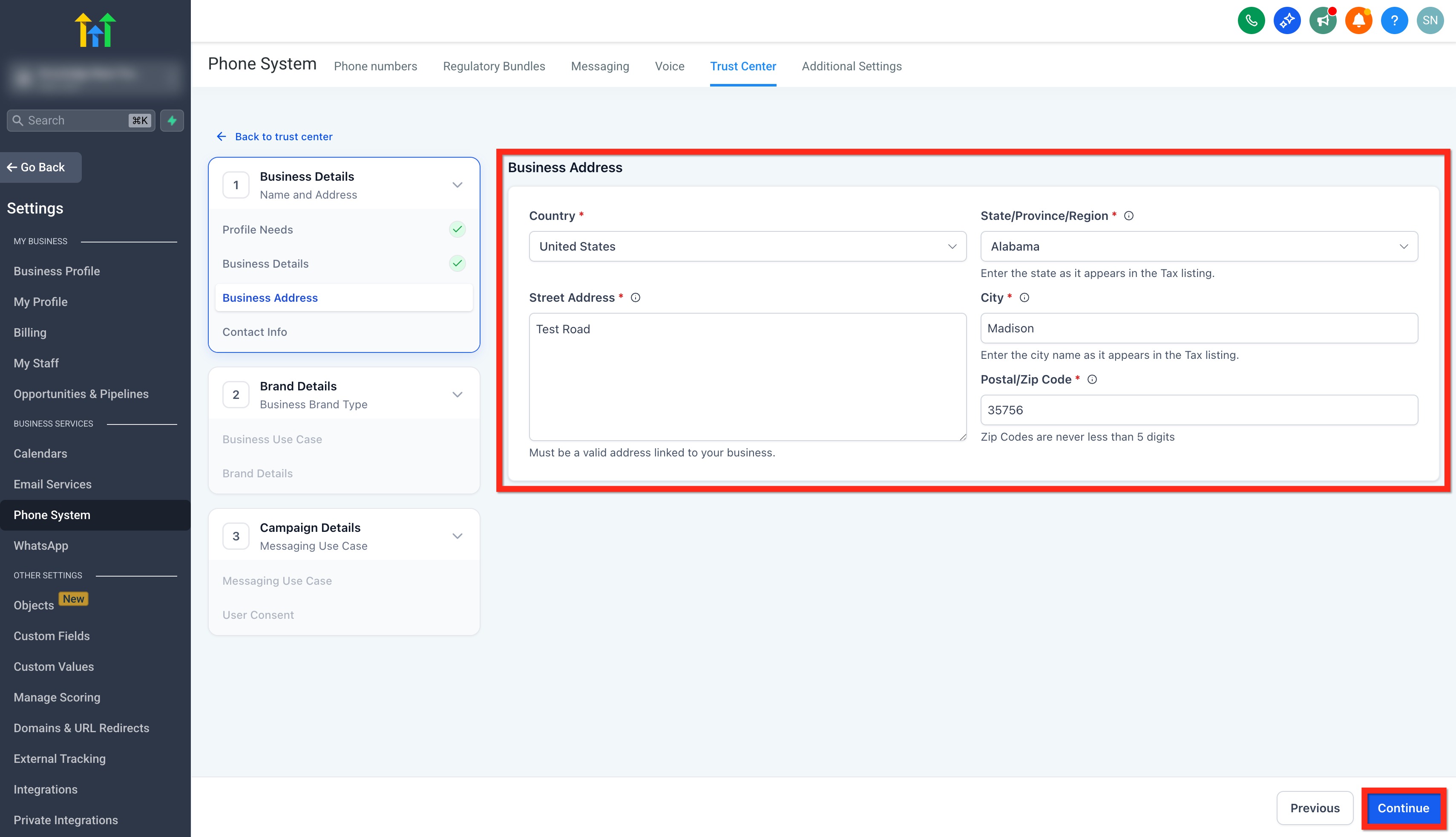
Step 4:Add Business Address
- Select yourCountry.
- Select yourState/Province/Region. (The address provided hereshould match the address mentioned in the cp575 form (US Only)
- AddStreet Address. (Must be a valid address linked to your business. Pleasedon't add a P.O box in the Street Address)
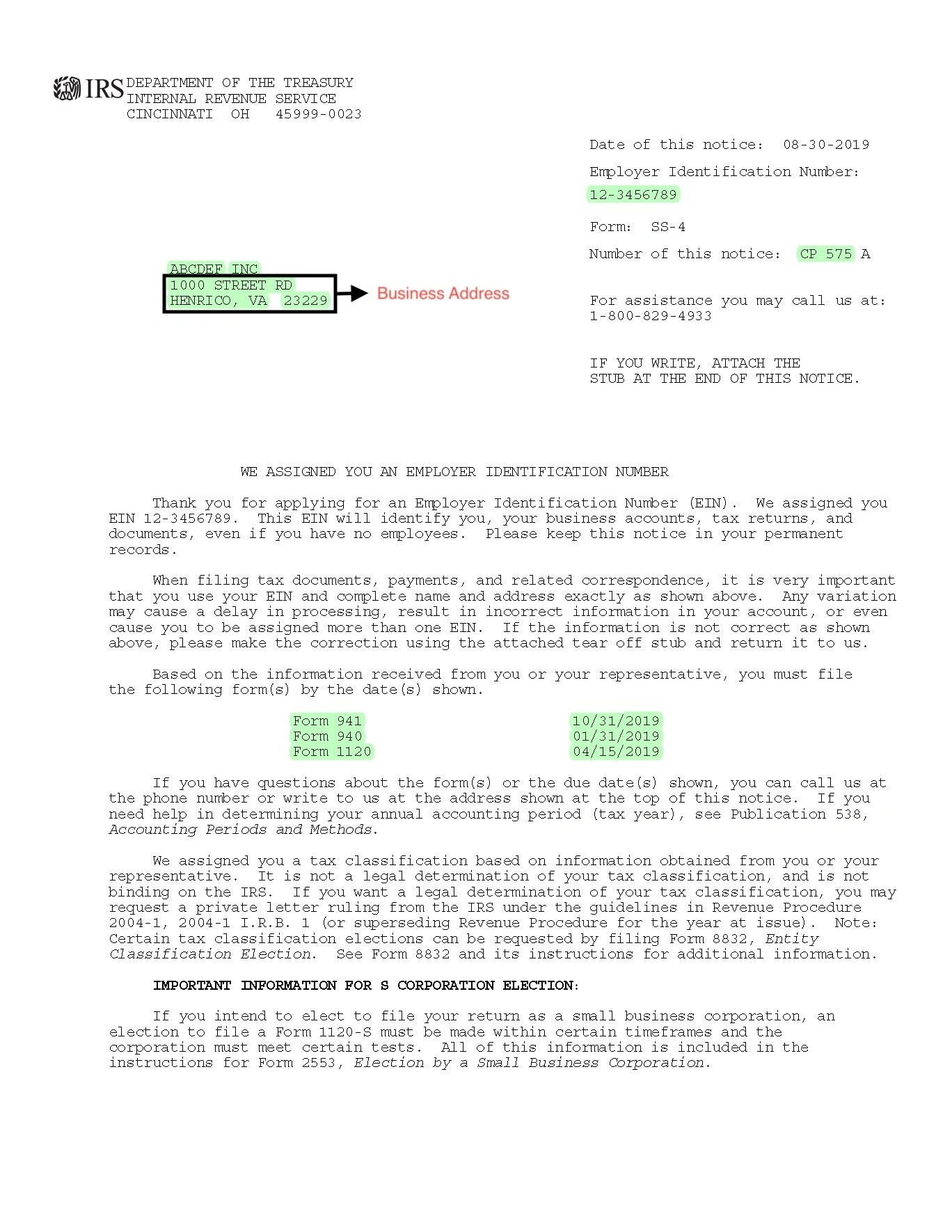
- Add yourCity. (The address provided hereshould match the address mentioned in the cp575 form (US Only)
- Enter yourPostal/Zip code. (The address provided hereshould match the address mentioned in the cp575 form (US Only)
- Click onContinue.
Step 5:Add Contact Information of Authorized Representatives
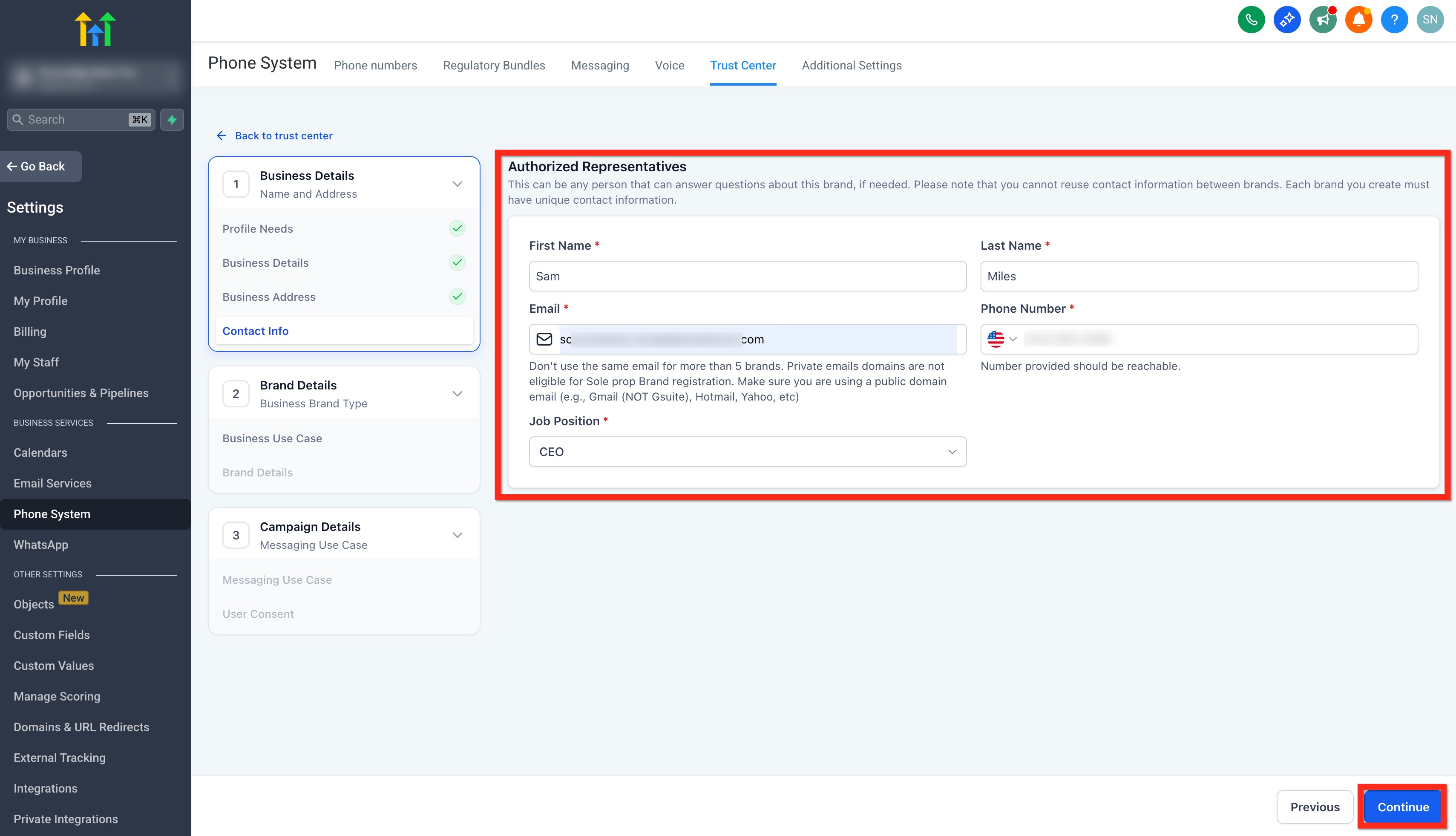
This can be any person that can answer questions about this brand, if needed. Please note that you cannot reuse contact information between brands. Each brand you create must have unique contact information.
- Add Authorized Representative'sFirstandLastName.
- AddEmail Address. (Don't usethe same email formore than 5 brands.Privateemaildomainsarenoteligiblefor Sole prop Brand registration. Make sure you are using a public domain email (e.g., Gmail (NOT Gsuite), Hotmail, Yahoo, etc)
- AddPhone Number. (Don't use the same number for more than5brands and number provided should be reachable)
- Select yourJob Positionfrom the list of designations or selectOtherand type in your designation.
- Click onContinue.
Note:Oneemailcan be used formax 5 brands. Please use different email if you have already used the email for more than 5 brands.
IMPORTANT: Once you click "Continue" or submit your contact details, you will now have to validate this through an OTP sent to your email address. It validates each email address by sending a unique 6-digit one-time password to ensure the sender’s identity is genuine.This new step strengthens the integrity of brand registrations and helps protect the platform from misuse without disrupting the experience for legitimate users. For more, refer toEmail OTP Verification for Secure A2P Brand Registration.

Step 6:Choose Your Business Use Case
TheBusinessBrand Typewill be automatically set to "Low/High VolumeStandard" based on the responses provided under Profile Needs.
Note:A2P Registration Fee Pricing is accurate as of August 2, 2025
- Low Volume StandardIt is designed for businesses with a valid EIN that needmoderate-scale messaging capabilitiesusing 10DLC.Requires avalid EIN(Employer Identification Number)Supports multiple phone numbersAllows up to6,000 SMS segments per dayOne-time registration fee of$24.49875(includes $3 Fast Track fee for approval within ~3 business days)Additional campaign fee up to $11.025 per monthwill apply in accordance with TCR rules for both failed and approved campaigns.
Low Volume Standard
- Requires avalid EIN(Employer Identification Number)
Requires avalid EIN(Employer Identification Number)
- Supports multiple phone numbers
Supports multiple phone numbers
- Allows up to6,000 SMS segments per day
Allows up to6,000 SMS segments per day
- One-time registration fee of$24.49875(includes $3 Fast Track fee for approval within ~3 business days)
One-time registration fee of$24.49875(includes $3 Fast Track fee for approval within ~3 business days)
- Additional campaign fee up to $11.025 per monthwill apply in accordance with TCR rules for both failed and approved campaigns.
Additional campaign fee up to $11.025 per monthwill apply in accordance with TCR rules for both failed and approved campaigns.

- High Volume StandardItis suited for largerbusinesses with high messaging needs, offering extensive daily capacity and multiple phone number support.Requires avalid EINSupports multiple phone numbersAllows up to600,000 SMS segments per dayOne-time registration fee of $71.90625(includes $3 Fast Track fee for approval within ~3 business days)Additional campaign fee up to $11.025 per monthwill apply in accordance with TCR rules for both failed and approved campaigns.
High Volume StandardItis suited for largerbusinesses with high messaging needs, offering extensive daily capacity and multiple phone number support.
- Requires avalid EIN
Requires avalid EIN
- Supports multiple phone numbers
Supports multiple phone numbers
- Allows up to600,000 SMS segments per day
Allows up to600,000 SMS segments per day
- One-time registration fee of $71.90625(includes $3 Fast Track fee for approval within ~3 business days)
One-time registration fee of $71.90625(includes $3 Fast Track fee for approval within ~3 business days)
- Additional campaign fee up to $11.025 per monthwill apply in accordance with TCR rules for both failed and approved campaigns.
Additional campaign fee up to $11.025 per monthwill apply in accordance with TCR rules for both failed and approved campaigns.

- Select the Brand Type as per your need and click onContinue.
Select the Brand Type as per your need and click onContinue.

Step 7:Add Campaign Details
- From theCampaign Use Casedropdown, selectLow Volume MixedorMixed(recommended). You can also select a specific use case as per your need from the list.
- In theUse Case Descriptionfield, explainwhat the campaign will be used for.Example:This campaign sends appointment information - confirmation & reminder messages to customers once they have booked an appointment with company_name on website and opted in to receive promotional and notification SMS from company_name.Note:If you have an EIN but use a different brand name, include “We are doing DBA as [Business_Name]” in the Campaign Use Case Description. You canregister up to 10 brands per EIN.
- Add Sample Message #1In the Sample Message #1 field, provide a message that includes:Lead's NameYour nameBusiness nameOpt-out language (e.g., Reply STOP to unsubscribe)Example:Hi John! This is Jane from company_name. Our appointment for July 20 at 11:00 AM is confirmed. Please reach out to (phone number) if you need to reschedule. Reply STOP to unsubscribe.
- Lead's Name
- Your name
- Business name
- Opt-out language (e.g., Reply STOP to unsubscribe)Example:Hi John! This is Jane from company_name. Our appointment for July 20 at 11:00 AM is confirmed. Please reach out to (phone number) if you need to reschedule. Reply STOP to unsubscribe.
- Provide a second sample message in the Sample Message #2 filed with the same required elements as above.Example:Hey Brian! This is Jane from company_name. I see you weren't able to make it to our appointment. Want to reschedule? - https://www.mycompany.com/book. Reply STOP to unsubscribe.
- Choose Content Included in Your MessagesSelect the options that your messages might include:The message will include anembeddedlink.The messages will includephonenumbers.The messages includeage-gated contentas defined by Carrier and CTA guidelines.The messages will include content related todirect lending or other loan arrangements.
- The message will include anembeddedlink.
- The messages will includephonenumbers.
- The messages includeage-gated contentas defined by Carrier and CTA guidelines.
- The messages will include content related todirect lending or other loan arrangements.
- Click onContinue.

Step 8:User Consent
To comply with carrier regulations, you’ll need to provide details on how your contacts give consent to receive messages and what your opt-in message looks like. Follow these steps:
Opt-In Method
- Choose anOpt-In Methodfrom the options:WebsiteForm,PaperForm,FacebookLead Form,QRCode,Kiosk,Verbal.

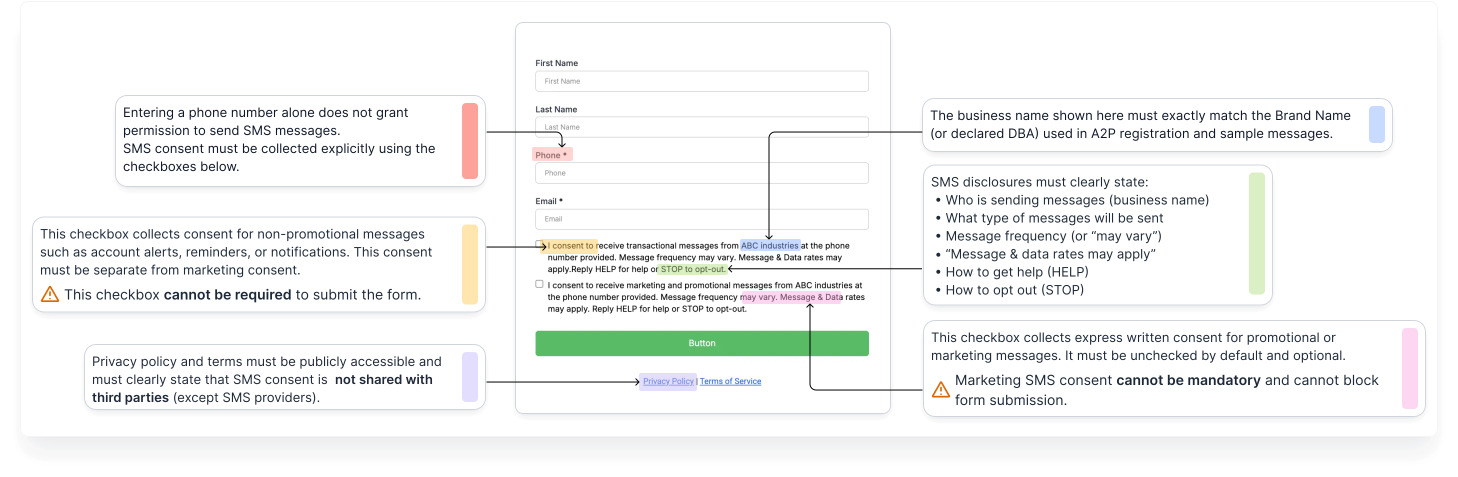
- Add Opt-In Form URL:Share a publicly accessible link to the website form where users enter their phone number and opt in to receive messages.

- Example opt-In Form:
Add the Opt-in Flow and Confirmation Message
- Add your Opt-in flow in theHow do Contacts Opt-in to Messages?field.Example:Customers opt in to receive SMS messages from LeadConnector LLC by entering their phone number into a website form that discloses message purpose, low-frequency expectations, and opt-out instructions. Proof of consent is available at (link)

- In the "Opt-in Message" field, enter theconfirmation message users receiveonce they’ve opted in.This message must: Include yourbusiness nameandtheopt-out keywordlikeSTOP.Example:LeadConnector LLC will send you recurring informational and promotional text messages. Message frequency varies. Msg & data rates may apply. Reply STOP to opt out. Reply HELP for help.

Business Website Compliance Checklist
Ensure your opt-in form and website meets the following carrier and platform guidelines.
Business Website Best Practices:1. Use a live, publicly accessible website with no broken links or "under construction" pages.

2. Clearly display your business name and maintain consistent branding across your domain, website content, and legal policies.

3. Clearly explain the services or products offered on your website.

4. Provide visible and up-to-date Privacy Policy and Terms & Conditions pages.

5. Ensure your opt-in form is easy to find and easy to understand, with CTIA-compliant language.

6. Collect explicit SMS opt-in consent; consent must be clearly stated and not implied.

7. Ensure sample messages accurately reflect your website content and intended messaging use case.

8. Link social media icons directly to your brand's official pages (not generic platform homepages).

9. Implement age-gating where required (e.g., alcohol, tobacco, or restricted content).

10. Use social media pages or app store listings only as supporting proof if a full website is not available.

11. Clearly display any DBA or alternate business names in the footer, Privacy Policy, or Terms & Conditions (if applicable).
- Pleaseselectall items in the Website Compliance Checklistto proceed and clickReviewApplication.

- Our system willreviewyourapplication, provideimprovementsuggestions, and display aPass/Failstatus. Make sure toaddressallflaggeditemsandachievea “Pass” acrosseverysectiontomaximizeyourchancesofapproval.
- Once done, click onProceed.

- Review your details for the last time and click onSubmitApplication.

IMPORTANT NOTE
- Ensure all registrationinformation matches government records exactly.
- Non-compliance or errors willresult in rejection and additional fees.
- Consult a legal professional if unsure about privacy policy, terms of service, or messaging language.
- Be aware ofSev-0 fines for prohibited content, which can range from $500-$2,000 per violation.
Handling the "Maximum 3 Tries Exhausted" Error
If you see the error "Maximum 3 tries exhausted", pleasefill out this formonce you have collected theCP 575 Form.It means the registration attempts have failed due to mismatched or invalid business details.
Next Steps:
- Obtain your CP 575 EIN Confirmation Letter(or request a 147c letter from the IRS if the CP 575 is unavailable).
- Upload your business registration formin your support communication with us.
Upload your business registration formin your support communication with us.
- Email or send a screenshotof your CP 575 form to the HighLevel team.
Email or send a screenshotof your CP 575 form to the HighLevel team.
We will submit this documentation on your behalf for Brand approval.
Important Tips:
- Ensure thelegal business name and EIN number exactly matchwhat’s shown on the CP 575 form.
Ensure thelegal business name and EIN number exactly matchwhat’s shown on the CP 575 form.
- Donotuse the business name found on W2 or W9 forms, as they may differ.
- If the business name spans multiple lines on your CP 575/147c letter, you must enterall lines above the address lineduring registration.Example:ABC Holding Group Inc.Division of Regional Services123 Main StreetNew York, NY 10001The legal name to enter would be:ABC Holding Group Inc. Division of Regional Services
If the business name spans multiple lines on your CP 575/147c letter, you must enterall lines above the address lineduring registration.Example:ABC Holding Group Inc.Division of Regional Services123 Main StreetNew York, NY 10001The legal name to enter would be:ABC Holding Group Inc. Division of Regional Services
Understanding Trust Scores & Throughput
Once submitted, your brand will be vetted and assigned aTrust Score (0–100) by TCR.
Higher scores allow forhigher Message Throughput (MPS)andbetter delivery rates. The Trust Score is determined based on your submitted information — EIN match, business type, domain verification, and more.
Check out our article for more information:Trust Scores and MPS Explained
Frequently Asked Questions
Q: What’s the difference between Sole Proprietor and Standard Brand?Sole Prop is for individuals without an EIN. Standard Brand is for registered U.S. businesses with an EIN.
Q: Why was my brand rejected?Likely reasons include EIN mismatch, invalid website, or use of a PO Box.
Q: Can I add new numbers after completing A2P Brand and Campaign Registration?Yes. Any numbers you add after your brand and campaign are approved will be automatically registered under the same campaign — no resubmission is needed. It may take several days for registration to complete.
Q: How much does this cost?Fees vary, checkout our article onUnderstanding A2P 10DLC Messaging Fees: Registration, Monthly, and Carrier Costs.
Q: Can I register multiple campaigns under one Standard Brand?Yes, you can register multiple use-case-specific campaigns.
Q: I don't want to deal with all of this. Is there any alternative for me and my clients?Yes, you can bypass A2P 10DLC by switching toToll-Free Numbers. These also require registration, but the process isfree and less complex. You can continue messaging in the U.S. without A2P 10DLC restrictions. See:Toll-Free Verification Guide for LC - Phone (US/Canada)
Q: How do we move from low volume sending to higher volume sending?Please reach out to HighLevel support. We’ll share a form that you can submit, and our team will create the brand and campaign manually in the backend for increased throughput.
Q: Does this apply to only marketing campaigns or does it apply to all SMS?
A2P 10DLC is applicable for all Application-to-Person texting like marketing SMS, reactivation campaigns, appointment reminders, prospecting, billing alerts, 2FA login codes, etc.
Q: How can I become compliant?
Please refer to the following help articles:
- A2P 10DLC Brand Approval Best Practices
- A2P 10DLC Campaign Approval Best Practices
Q: How do I request this info from my clients?
You can use the following forms to collect this information from your clients
[Google Doc Link] [Printable PDF Link]
Related Articles
- Campaign Registration Step by Step Guide and FAQs
- Important Updates for A2P 10DLC Messaging
- A2P Sole Proprietor Brand Registration for 10DLC
- A2P 10DLC Campaign Rejection Reasons
- A2P 10DLC Campaign Use Cases
- Updated Messaging Policies for Canadian 10DLC Numbers: A2P Registration Requirements