
Melhores Práticas para Aprovação de Campanhas A2P 10DLC
Learn how to get your A2P 10DLC campaign approved on the first try—what to include, what to avoid, and how to show consent, sample messages, and clear use-case details.
TABLE OF CONTENTS
- A2P 10DLC Campaign Approval Requirements
- Data Accuracy and Consistency Best Practices
- Collecting Consent Best Practices
- Opt-In Methods
- Double Opt-In in A2P 10DLC
- Campaign registration recommendations
- Campaign Failure/Rejection Reasons
- Related Articles
A2P 10DLC Campaign Approval Requirements
On January 26, 2023, a new A2P 10DLC Campaign vetting process went into effect. For details on the change, see this article. This change is relevant to customers using long code numbers to send messages to the United States, under the A2P 10DLC framework.
Effective January 26, 2023, newly registered A2P Campaigns are subject to a manual vetting process.To help ensure your Campaigns are approved in this vetting process, please follow these best practices when submitting new Campaigns.
Note:Please do not includePersonal Identifiable Information (PII)in campaign registration fields. Publicly available information like brand names and phone numbers is acceptable.
Important: Forbidden Use Cases Will Result in Campaign RejectionMake sure your A2P Campaign does not involve prohibited content such as cannabis, hate speech, etc., and that your use case is compliant with theMessaging Policy.ReadForbidden message categories for SMS and MMS in the US and Canadafor more information.
Data Accuracy and Consistency Best Practices
Best Practice
Examples
Consistency across brand, website, and sample messages
✅Example 1:Best Chance for Approval
- Brand name:Acme
- Website:www.acme.com
- Samplemessage:“Here’s your one-time passcode for logging intowww.acme.com.”
❌Example 2:Will Be Rejected
- Brand name:ABC Marketing
- Website:www.acme.com
- Samplemessage:“Here’s your one-time passcode for logging intowww.contoso.com.”
Consistency between your sample messages and use cases
❌Your Campaign Will Be Rejected If:
- You register a marketing campaign but sample messages say,“Here’s your one-time passcode: 123456”, which would clearly indicate some sort of login process.
Consistency in email domain and company name
❌Your Campaign Will Be Rejected If...
- Your Brand:LeadConnector Inc
- Email in A2P Application:LeadConnectorInc@gmail.com
✅Your email address should consist of your branded domain, for example:JohnF@LeadConnectorInc.com
❌Your Campaign Will Be Rejected If...
Make sure the brand you register is the actual brand that will be sending messages to consumers
❌Your Campaign Will Be Rejected If...
Company Information Registered in A2P Application:
Your marketing agency or software company’s information (e.g., a companythat provides the tech for dental offices)
Messages Sent From:
Your customer (e.g., individual dentist practices)
Make sure you create as few duplicate brands and campaigns as possible
Excessive brands with the same EIN and excessive campaigns with the same campaign attributesmay be seen as high-risk and may result in campaignrejection.
For templated messages, indicate the templated fields in your sample messages with brackets [Like This] to help reviewers better identify which parts are templated.
✅For Example:
-“Dental check due for[Mary Doe], Visit[www.contoso.com]to schedule an appointment or call[123-456-7890]”
Collecting Consent Best Practices
Note:Please refer to theCTIA guidelinesfor detailed instructions and best practices on handling consumer consent.
IMPORTANT:The ecosystem constantly improves the vetting criteria as it comes across additional violations.1. Following the best practices listed aboveDOES NOTguarantee approval.2. Best practices below illustrate the general direction of compliant, high-quality messaging that the ecosystem is moving towards.
Best Practice
Examples
Make sure consumer opt-in is collected appropriately
❌Your Campaign Will Be Rejected If...
Your Defined Opt-In Method When Registering:
Text message
Your Sample Message When Registering:
“Hi, is this the owner of 123 Oak Street? I’d like to discuss how I can help you sell your property”
*It is clear that you have not collected appropriate consent before sending messages
Opt-in language MUST be available on your website if during registration you indicated that a consumer opts into your campaign on your company website
❌Your Campaign Will Be Rejected If...
If your brand Acme uses its website, www.acme.com, to collect phone numbers but your website does not contain opt-in language.
Example Opt-In Language:
“By providing your phone number, you agree to receive text messages from ACME. Message and data rates may apply. Message frequency varies.”
We recommend having opt-out language in at least one of your sample messages.
For example, addlanguage such as:
“Please reply STOP to opt-out” in one of your sample messages.
IMPORTANT:Brands cannot submit Campaigns using[company name]and will need to update their flows to have their ownBRAND NAMErather than"the company"or"the business"Brands cannot use HighLevel's demo numbers in their opt-in flows and campaigns.Brands cannot submit using HighLevel's sample number provided in guidance. (eg: "Additionally end users can also text START to +1 (213) 725-2867.")
Opt-In Methods
Campaigns require a proper opt-in method which ensures that end-users provide consent to receive text messages. Verbal opt-in is the most difficult method to verify however, is acceptable as long enough details are provided that a 3rd party reviewer can verify.
1. Verbal Opt-In
Below is an example of a verbal opt-in, which would happen during a phone call with the consumer. You can also get a verbal opt-in by using a phone IVR flow, which would consist of an automated system getting opt-in confirmation from the consumer.
- Phone IVR:"As part of our service we can send you automated monthly text alerts regarding account payment activity. We will send two messages per month. Message and data rates may apply, depending on your mobile phone service plan. At any time you can get more help by replying HELP to these texts, or you can opt-out completely by replying STOP. Mobile Terms of Service are available at http://ghl.com/terms and our Privacy Statement can be found at https://ghl.com/privacy. Please reply with 'yes' or 'no' to indicate if you would like this service".
- Customer:"Yes please"
- Phone IVR:"Great! We will send you a text message to confirm your enrollment here shortly."
2. Web Form Opt-In
An embedded form (e.g. form, survey, quiz, web chat widget or calendar booking)on the end business’s website prompts end-users to enter their mobile phone number and opt into the texting campaign.
Important Requirements for Web Form Opt-In:
- Consent Checkboxes are Always OptionalOpt-in checkboxesCANNOTbe required to submit the form. Even if the phone number is required, checking the consent box must remain optional for submission. Submitting a form (even with a phone number) cannot be conditional on marketing consent. After submission, you must execute the communication channels based on their consent checkbox selections only.
- No Pre-Selection of CheckboxesConsent checkboxescannot be pre-selected by default. The users must manually select the consent checkboxes that they would like to agree to.
- Strict Separation between Marketing vs Non-Marketing MessagesConsent checkboxes must be distinct for Marketing messages vs. Non-Marketing messages so subscribers can opt into one, both, or neither. Opt-in checkboxMUSTinclude a disclaimer (consent message) such as:"I consent to receive marketing text messages, about special offers, discounts, and service updates, from[BUSINESS NAME]at the phone number provided. Message frequency may vary. Message & data rates may apply. Text HELP for assistance, reply STOP to opt out.""I consent to receive non-marketing text messages from[BUSINESS NAME]about[USE_CASE_FROM_CAMPAIGN_DESCRIPTION]. Message frequency may vary, message & data rates may apply. Text HELP for assistance, reply STOP to opt out."[BUSINESS NAME]should match what’s on the CP 575/147C Document.
- "I consent to receive marketing text messages, about special offers, discounts, and service updates, from[BUSINESS NAME]at the phone number provided. Message frequency may vary. Message & data rates may apply. Text HELP for assistance, reply STOP to opt out."
- "I consent to receive non-marketing text messages from[BUSINESS NAME]about[USE_CASE_FROM_CAMPAIGN_DESCRIPTION]. Message frequency may vary, message & data rates may apply. Text HELP for assistance, reply STOP to opt out."[BUSINESS NAME]should match what’s on the CP 575/147C Document.
- Opt-in disclaimerMUSThave All CTA (Call to Action) disclosures present to be considered compliant:Program name and/or a description of the messages that will be sent (appointment reminders, marketing messages, occasional offers, etc.)The organization or individual being represented in the initial messageFee disclosure (“Message and data rates may apply”)Service delivery frequency or recurring messages disclosure (“4 messages per month”, “Message frequency varies”, “1 message per login”, etcCustomer care information (typically “Text HELP for help” or Help at XXX-XXX-XXXX) - not required for single message programs (i.e 2FA)Opt out instructions (typically “Text STOP to unsubscribe”) - not required for single message programs (i.e 2FA)Link to Privacy Policy describing how end user opt-in information will be used. Be sure there is no mention of sharing of personal information with Third Parties (Must not be part of the checkbox statement. Instead, provide the link at the bottom of the form)Link to Terms and Conditions describing terms of service (Must not be part of the checkbox statement. Instead, provide the link at the bottom of the form)Incorporate a checkbox option that end-users must select in order to receive SMS messaging.The checkbox can not be pre-selected and cannot be required to submit form.The checkbox provides the end-user the ability to agree, or not agree, to receive SMS messaging.
- Program name and/or a description of the messages that will be sent (appointment reminders, marketing messages, occasional offers, etc.)
- The organization or individual being represented in the initial message
- Fee disclosure (“Message and data rates may apply”)
- Service delivery frequency or recurring messages disclosure (“4 messages per month”, “Message frequency varies”, “1 message per login”, etc
- Customer care information (typically “Text HELP for help” or Help at XXX-XXX-XXXX) - not required for single message programs (i.e 2FA)
- Opt out instructions (typically “Text STOP to unsubscribe”) - not required for single message programs (i.e 2FA)
- Link to Privacy Policy describing how end user opt-in information will be used. Be sure there is no mention of sharing of personal information with Third Parties (Must not be part of the checkbox statement. Instead, provide the link at the bottom of the form)
- Link to Terms and Conditions describing terms of service (Must not be part of the checkbox statement. Instead, provide the link at the bottom of the form)
- Incorporate a checkbox option that end-users must select in order to receive SMS messaging.The checkbox can not be pre-selected and cannot be required to submit form.The checkbox provides the end-user the ability to agree, or not agree, to receive SMS messaging.
Click herefor more information on Web Form Opt-In Requirements
Example of a Web Form Opt-In flow
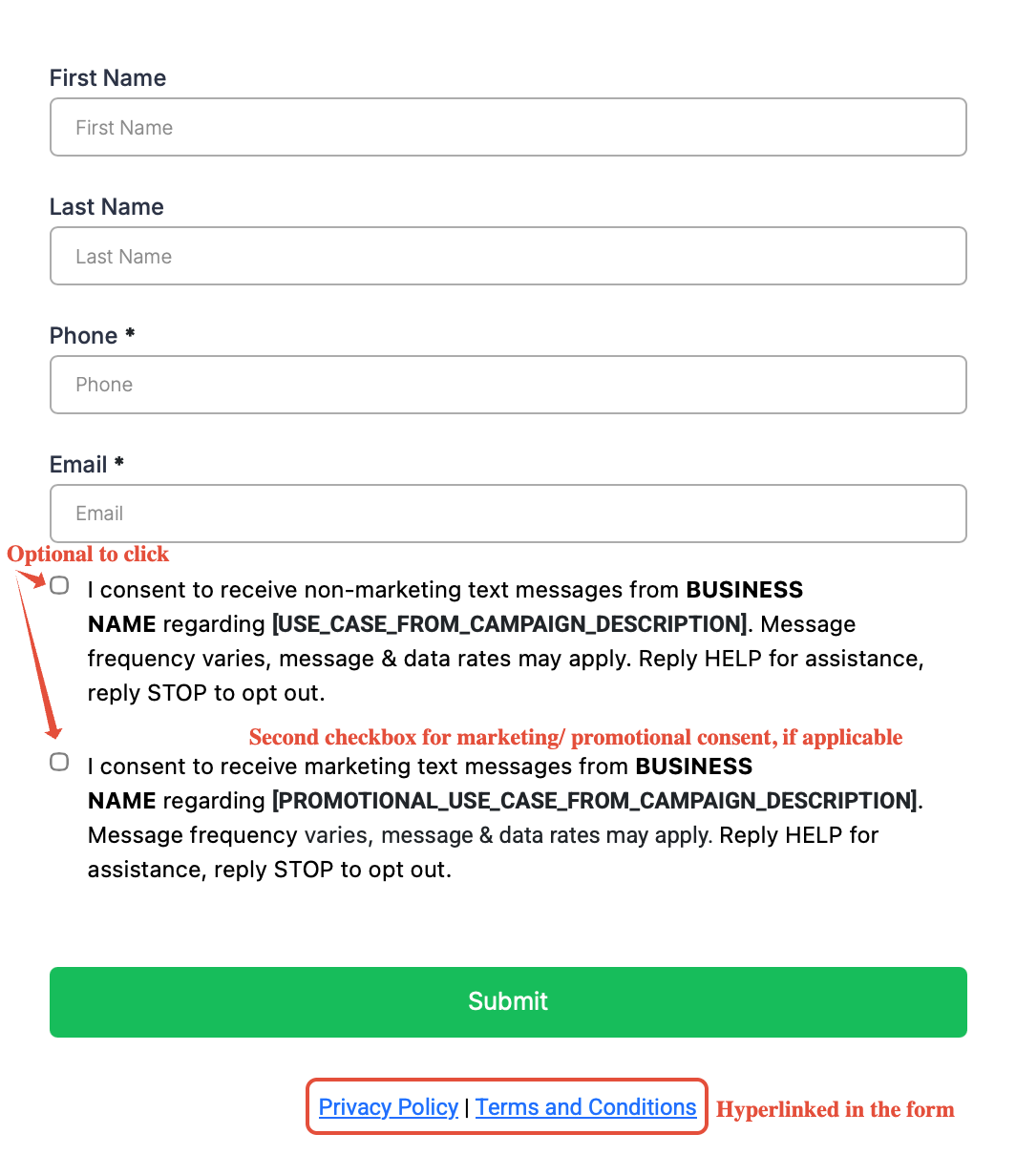
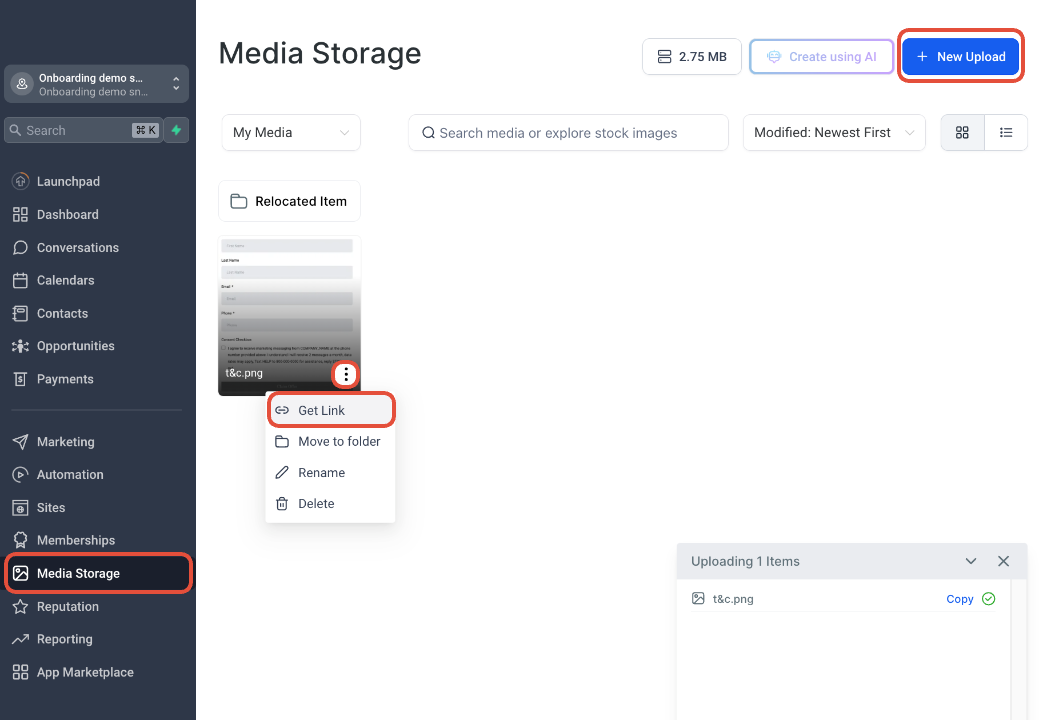
PLEASE NOTE:If the web opt-in is behind a login or not yet published, host a screen shot on a publicly accessible website (like OneDrive or Google Drive) and provide the image URL and the website URL in your registration form where it asks:"How do end-users consent to receive messages?"To get a useable image link, you can upload the screenshot to yourMedia Storage Libraryin yourHighLevel sub-accountas shown in the screenshot below:
3. Paper Form Opt-In
An in-store visitor completes a physical form that collects their phone number and their consent to subscribe to your texting campaign.
Host a screenshot of the paper form on a publicly accessible website (like OneDrive or Google Drive or Sub-Account's media library) and provide the URL in the answer for "How do end-users consent to receive messages?".
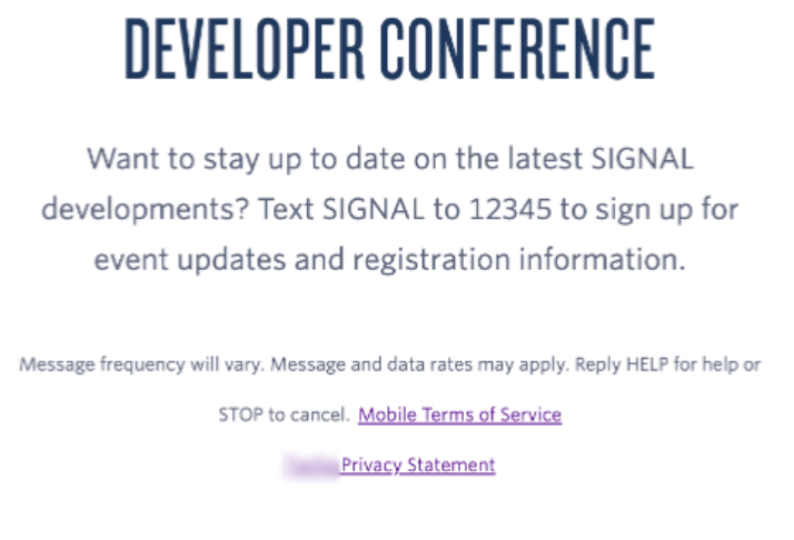
4. Text Message Opt-In
Host a screen shot of the campaign collateral on a publicly accessible website (like OneDrive or Google Drive or Sub-Account's media library) and provide the URL in the answer for "How do end-users consent to receive messages?" along with the website URL.
5. Mobile QR Code Opt-In
You can also use a QR code that links to an online form prompting end-users to enter their mobile phone number and opt into the texting campaign.
QR codes can direct the consumer to the messaging application used on theirmobile device (for example iMessage)with a templated opt-in message, or can even take the consumer directly to a web-form opt-in on your website.
Note:If the QR code leads to a Web-Form Opt-In, please follow all requirements listed in this article above where we discuss the Web-Form Opt-In method.
Double Opt-In in A2P 10DLC
Double Opt-In (DOI) is a compliance practice in A2P 10DLC messaging where users must confirm their consent twice before receiving SMS communications from a business. It enhances compliance with carrier and regulatory requirements, reducing the risk of spam complaints and improving message deliverability.
How Double Opt-In Works
- Initial Sign-Up (First Opt-In)A user expresses interest in receiving SMS messages by submitting their phone number via a web form, text message, mobile app, or another method.Example:A customer texts "JOIN" to a 10DLC number.
- Confirmation Request (Second Opt-In)The business sends an SMS asking the user to confirm their subscription, typically by replying with a keyword like "YES."Example:You requested to receive messages from [Brand Name]. Reply YES to confirm. Msg & data rates may apply.
- Final ConfirmationOnce the user replies with “YES” they are officially subscribed and can receive further marketing or transactional messages.
Why Double Opt-In is Important in A2P 10DLC
- Reduced Spam Complaints:Prevents accidental or fraudulent sign-ups, reducing the risk of messages being marked as spam.
Reduced Spam Complaints:Prevents accidental or fraudulent sign-ups, reducing the risk of messages being marked as spam.
- Higher Deliverability:Carriers are more likely to allow traffic from numbers that follow proper opt-in procedures.
- Improved Customer Trust:Users who confirm twice are more engaged and less likely to opt out later.
Campaign Registration Recommendations
Campaign registrations should meet each of the following descriptions for each field.
Campaign Type
Please choose the use case that best represents your campaign. For more information, please refer to the details providedhere.
Successful Example
Failed Example
2FA use case is selected for any authentication or account verification such as OTP.
Higher Education is selected for any authentication or account verification such as OTP.
Why is this rejected?Use case would not match intended use, campaign will be rejected.
Campaign Description
The description should be thorough and explain the campaign’s objective or purpose. Provided description needs to answer who the sender is, who the recipient is, and why messages are being sent to the intended recipient.
Successful Example
Failed Example
“Messages are sent by Acme to its existing customers. OTP Messages for MFA challenges for logging into the online portal to make changes to a user profile for security purposes.
Customers confirm with an SMS when profile changes are made.”
“Blank”
Why is this rejected?No information is provided for the campaign's purpose.
“This campaign sends messages to customers”
Why is this rejected?It does not provide information on who is sending and receiving messages and why messages are being sent.
How do end-users consent to receive messages?
The answer should contain the following information:
- The program or product description
- Telephone number(s) from which messaging will originate
- Identify of the organization or individual being represented in the initial message
- Clear and conspicuous language about opt-in and any associated fees or charges
- Compliant Privacy Policy
- Other applicable terms and conditions (e.g., how to opt-out, customer care contact information)
Opt-in needs to apply per campaign, should be not transferable or assignable and can not be obscured in terms and conditions (especially terms related to other services). If multiple opt-in methods can be used for the same campaign, please list them all.
A compliant Privacy Policy must state that no mobile information will be shared with third parties/affiliates for marketing/promotional purposes. Information sharing to subcontractors in support services, such as customer service is permitted. All other use case categories exclude text messaging originator opt-in data and consent; this information will not be shared with any third parties.
Campaign reviewers need to be able to verify details provided in this field. Provide evidence such as a hosted link to screenshot or document for opt-in that occurs behind a gated login or on a paper form.
Successful Example
Failed Example
Message Flow:“Customers provide opt-in specifically when enrolling into our website, or in person by requesting SMS capabilities within the store. Opt-in during website is a self-service process and occurs at acme.com/signup”Website Opt-in Language:“By submitting, you authorize ACME to send text messages with offers and other information. Message/data rates apply. Consent is not a condition of purchase. [Link to terms and conditions].”
“Customers sign up”
Why is this rejected?Where and how the customer provides opt-in is unclear.
Sample Message
Sample messages should reflect actual messages to be sent under the campaign and indicate templated fields with brackets. Ensure consistency with use case and campaign description.Sample messages should identify who is sending the message (brand name). Ensure that at least one sample message includes your business name.Include opt-out language to at least 1 sample message.
Successful Example
Failed Example
“ACME 2FA Notice:Here is your one time password: 1234
Call [phone-number] to report if this request was not made by you.”
“You have an upcoming appointment”
Why is this rejected?Opt-out is not provided, campaign will be rejected.
Opt-in Keywords
Please provide all keywords that allow users to opt-in to receive campaign messages.
Successful Example
Failed Example
“START,OPTIN, UNSTOP,IN”
“Blank”
Why is this rejected?Message flow indicates customers can opt-in through text but no opt-in keywords are provided, campaign will be rejected
Opt-in Confirmation Message
Campaign must provide customers with an opt-in confirmation message. This is required for all recurring campaigns, regardless of opt-in method,CTIA Messaging Principles and Best Practices.
It should not exceed 160 characters. Must have the following:
- Program (brand) name or product description
- Customer care contact details: Reply HELP for help
- Opt-out instructions: Reply STOP to opt-out.
- Disclosure: that the messages are recurring and the frequency of the messaging
- Message frequency (must align with the frequency on the CTA and SMS Terms)
- A “Message and data rates may apply” disclosure
Successful Example
Failed Example
“You are successfully opted in for messages from ACME for account notifications. Message and data rates may apply. Reply Help for additional support. Reply STOP to unsubscribe.”
[Company name]: Thank you for signing up for updates! Msg freq varies. Msg&Data rates may apply. Reply HELP for help, STOP to cancel.
“You opted in for messages”
Why is this rejected?Opt-in message does not contain any information on brand and no information on opt-out process, campaign will be rejected.
Opt-out Keywords
Please provide all keywords that allow end users to stop receiving messaging from this campaign.
Successful Example
Failed Example
“STOP,UNSUBSCRIBE,
END,QUIT, CANCEL, STOP ALL”
“Blank”
Why is this rejected?default Opt-out handling is disabled. As such, opt-outs must be handled via Advanced Opt-Out or by your application. Specify the keywords you have configured for Opt-out handling.
Opt-out Confirmation Message
When end users send opt-out keywords, the response messages need to include acknowledgement of opt-out request, brand name, and confirmation that no further messages will be sent.
Successful Example
Failed Example
"You have successfully been unsubscribed from Acme Corporation. You will not receive any more messages from this number."
“Opt-out successful. You will not receive any more message from us.”
Why is this rejected?Opt-out message does not include brand, campaign will be rejected.
Help Keywords
Please provide all keywords that allow end users to receive more information about this campaign.
Successful Example
Failed Example
“HELP, ISSUE, FIX, RESOLVE, INQUIRY”
“Blank”
Why is this rejected?Default HELP keyword handling is disabled on the associated account. Customer must provide the keywords they have configured in Advanced Opt-out or their own application..
Help Message
When end users send help, the response message needs to include brand name, phone number, or email address.
Successful Example
Failed Example
"Acme Corporation: Please visit www.acmecorporation.com to get support. To opt-out, reply STOP."
[Company name]: For help please email [email] or call us at [Toll free number].
“Blank”
Why is this rejected?Default HELP keyword handling is disabled on the associated account. Customer must provide the HELP messages that are sent in response to HELP keywords they have configured in Advanced Opt-out or their own application.
Campaign Failure/Rejection Reasons
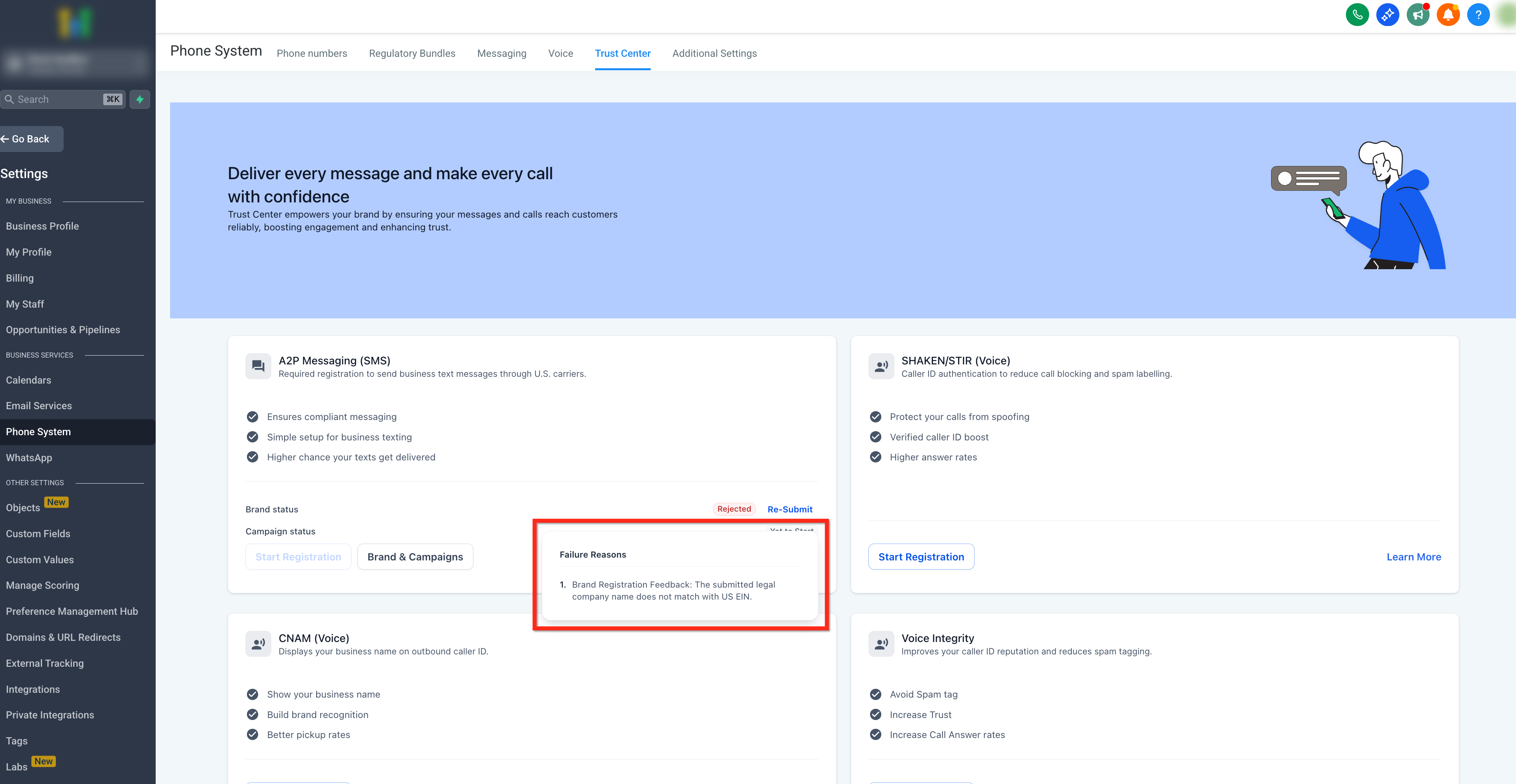
You can now view rejection reasons directly in the UI. Once you are in the Trust center tab, click on "Failed" to review the Campaign Failure Reason. All failed/rejected campaigns will now display their specific failure reasons.
PLEASE NOTE:TCR (The Campaign Registry) often rejects a campaign based on the first issue they encounter, potentially overlooking other issues. Do not focus solely on the rejection reason and instruct the client on how to resolve it, as they might correct that issue, resubmit, and face rejection again for a different reason. Instead, review the entire campaign submission and the client’s website to ensure everything is correct and compliant.
Failure/Rejection Reason #1:Message Flow
- The campaign submission has been reviewed and it was rejected because of provided Opt-in information.
Approved example:
- End users opt-in by visiting - https://brandname.com/contact_us and filling in their details on the survey Users check a box to receive messages from us to provide their consent at the end of the survey:https://storage.googleapis.com/msgsndr/xxxxxxxxx.png
- You can upload the screenshot of the opt-in to the Media file inside the sub-account. Make sure the link go straight to the form with an optional consent checkbox. If the checkbox is showing at the end of the survey or behind an appointment form. Please supply a hosted link to an image of the opt-in
Possible Causes
- Opt-in message workflow does not meet the requirements for the specific campaign type.
- Consent is required but not adequately provided or maintained.
- Opt-in information is shared with third-party entities.
Possible Solutions
- Ensure compliance with Messaging Policy relating to opt-in
- Detail All Opt-in Methods: Include all methods of opt-in, whether electronic, paper form, in-person verbal opt-in, or other means.
- Provide Necessary Links and Documentation: If opt-in is collected through a paper form or behind a login, supply a hosted link to an image of the opt-in. If the opt-in occurs on a website, provide the relevant link.
- Include Privacy Policy and Terms of Service: The website where opt-in occurs must contain a privacy policy and terms of service.
- Avoid Third-Party Sharing: Make sure that opt-in information is not shared with unauthorized third parties.
- Ensure Opt-in is Verifiable: Each campaign is manually reviewed and needs to be verifiable by a human.
Failure/Rejection Reason #2:Invalid Website URL
- The campaign submission has been reviewed and it was rejected because of unverifiable website.
Possible Causes
- An invalid URL was provided during the registration process.
- The website associated with the campaign is not functioning or inaccessible.
- Opt-in flow is not found on website provided.
- Lack of proper indication in the campaign description if the registration pertains to a pre-launch website.
Possible Solutions
- Verify that the provided website(s) are functioning correctly, and accessible.
- If the registration is for a pre-launch website, instead include a publically accessible URL to view a screenshot of the SMS opt-in flow that will appear.
- If opt-in occurs on website, provide the direct link in the Message Flow field.
- If opt-in is collected through a paper form or behind a login, supply a hosted link to an image of the opt-in. If the opt-in occurs on a website, provide the relevant link.
- Once you have made a change to address the issue, please resubmit the campaign for review.
Failure/Rejection Reason #3:Incorrect Sole Prop Brand Registration
- The campaign for a Sole Proprietorship Brand has been rejected due to incorrect registration and failure to meet the small business Sole Proprietor (EIN) criteria set by TCR and mobile carriers.
Possible Causes
- Failure to meet the specified criteria for Sole Proprietor registration, entities with EINs should be registered as a Standard Brand.
- Incorrect or incomplete registration information provided during the brand registration process.
- Inconsistencies or discrepancies in the provided information.
Possible Solutions
- Verify the accuracy and completeness of the registration information for the Sole Proprietorship Brand.
- Ensure that the brand meets the criteria defined by TCR and mobile carriers for Sole Proprietor (EIN) registration.
- If the brand does not qualify as a Sole Proprietorship, consider registering it as a standard brand according to the appropriate guidelines and requirements.
- Register a standard or acceptable campaign use case that aligns with the registered brand's classification.
- In conclusion, first question is, does the business have an EIN? For DBAs you must use the business name and address in the EIN registry number that you use.
Failure/Rejection Reason #4:Unknown Reason
- The campaign submission has been reviewed and it was rejected because of an unknown reason.
Possible Causes
- The campaign cannot be approved because of an unknown error and may stem from an issue raised by other vetting parties in the ecosystem.
Possible Solutions
- Our Support team has the means to obtain more detailed information about this specific error. Please contact Customer Support for assistance in understanding the underlying problem and finding a resolution.
Failure/Rejection Reason #5:Inconsistencies Between Sample Message and Use Case
- The campaign submission has been reviewed and rejected due to inconsistencies between the sample message and the intended use case of the campaign.
Possible Causes
- Sample messages are missing, unclear, or their content does not match the campaign's use-case.
- Invalid content within the sample messages.
Possible Solutions
- Verify that the sample messages are accurate, detailed, and reflective of the actual messages to be sent under the campaign.
- Indicate templated fields within sample messages using brackets.
- At least one of the sample messages should include your business name and opt-out message.
- Ensure at least two sample messages are provided.
- Ensure that the use case and campaign description align with each other.
- Once you have made a change to address the issue, please resubmit the campaign for review.
Failure/Rejection Reason #6:The campaign submission has been reviewed and rejected due to issues verifying the Call to Action (CTA) provided for the campaign.
- The campaign submission has been reviewed and rejected due to issues verifying the Call to Action (CTA) provided for the campaign.
Possible Causes:
Unverifiable CTA: The Call to Action associated with the campaign could not be verified during the review process. If opt-in occurs outside of the website, then provided information was incomplete or not fully detailed.
Possible Solutions:
Provide complete CTA information and all possible methods of receiving consent. If opt-in is not conducted through the website, please detail and provide documentation on how the CTA is presented to and actioned by end-users. Once you have made a change to address CTA verification issues, please resubmit the campaign for review.
Frequently Asked Questions
Q. What’s the fastest way to avoid rejections on first submission?Provide a working website, clear campaign description, matching sample messages (with bracketed template fields), and a publicly accessible CTA/opt-in proof; keep brand/website/samples consistent.
Q. Do I need a public Terms & Conditions page?Yes. Your T&C must be publicly accessible; link it from your website. You can use carrier-aligned boilerplate as a starting point.
Q. What should my sample messages include?Identify the sender/brand, bracket template fields (e.g., [Name]), and include opt-out language in at least one sample. Ensure samples match the declared use case.
Q. Why was my campaign rejected for “inconsistency”?Common causes include mismatched brand vs. website, sample messages implying a different use case (e.g., OTP/login in a “marketing” campaign), or using an unbranded/free email for large orgs.
Q. What are the required CTA disclosures for web-form opt-in?Program/description, brand identity, fees (“Message and data rates may apply”), message frequency, HELP/STOP details (where applicable), and links to Privacy Policy and Terms & Conditions.
Q. Can I use verbal opt-in?Yes, but it’s harder to verify. Provide enough details (or IVR transcript) so a third-party reviewer can confirm consent and required disclosures.
Q. Are pre-checked consent boxes allowed on web forms?No. Opt-in checkboxes must be optional and not required to submit the form; consent and promotional checkboxes should be separate.
Q. Do I need to include STOP/HELP language?Include opt-out (STOP) in at least one sample. Help contact info/HELP handling may be required depending on program type and default handling.
Related Articles
- LC Phone System Trust Center
- How to Submit a Campaign?
- List of Campaign Use Case Types for A2P 10DLC Registration
- A2P 10DLC Campaign Vetting FAQ
- A2P Registration Opt-In Form - Terms and Conditions Guidelines